
Partner Co-Selling Management,
built for every persona in your channel ecosystem.
ZINFI’s Co-Sell application — embedded inside the SELL zone of the Unified Partner Management (UPM) platform — orchestrates a 12-step co-sell flow that takes vendor and partner teams from account upload to mutual reveal to joint pipeline, with privacy, governance, and revenue attribution built in.
Unified Co-Sell Flow. Unlimited Roles. Zero Spreadsheets.
Channel programs span Global Admins, Channel Account Managers, partner sales reps, and analytics owners — and ZINFI’s embedded AI does the connective work between them. Partner matching, account matching, deal matching, deal scoring, task generation, note synthesis, multi-channel messaging — every connective tissue between vendor and partner is AI-driven and surfaced through persona-aware analytics. You define the workflows and make the decisions. The platform adapts and handles the busy work. Secure, adaptive, agile co-selling at the speed of AI — the way SaaS was meant to be.
Global Admin
The enterprise-wide platform owner who configures ZINFI’s Co-Sell program for the entire organization — spinning up regional admin scopes, defining the product and price-book master, governing data-reveal rules, and standing up the 12-step co-sell flow that every channel team operates inside.
Multi-tenant admin architecture for global co-sell programs
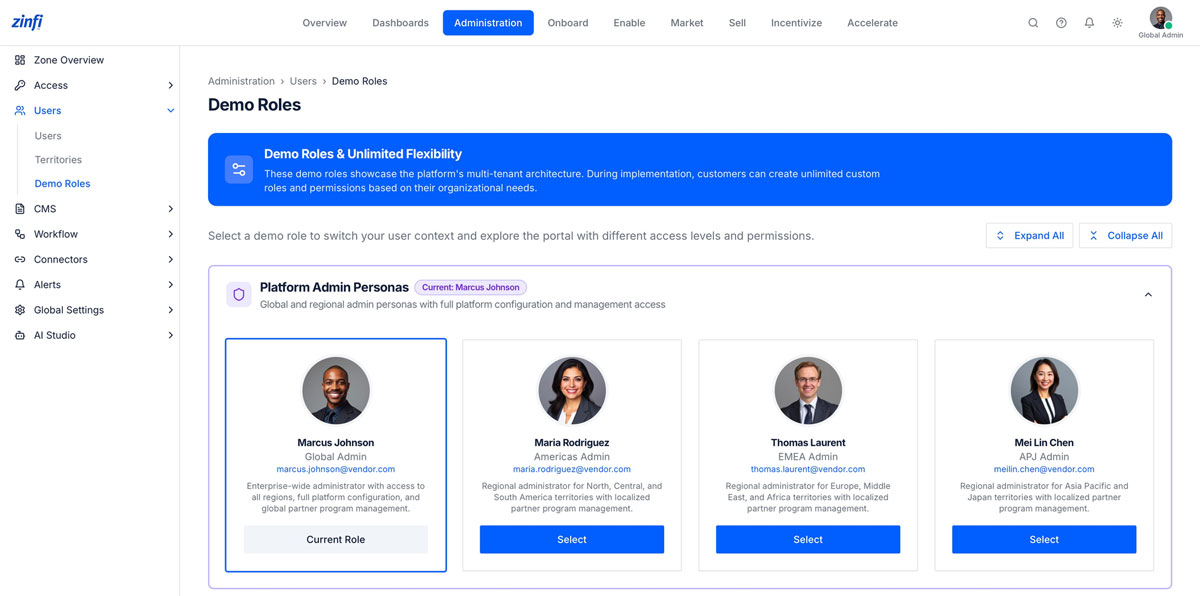
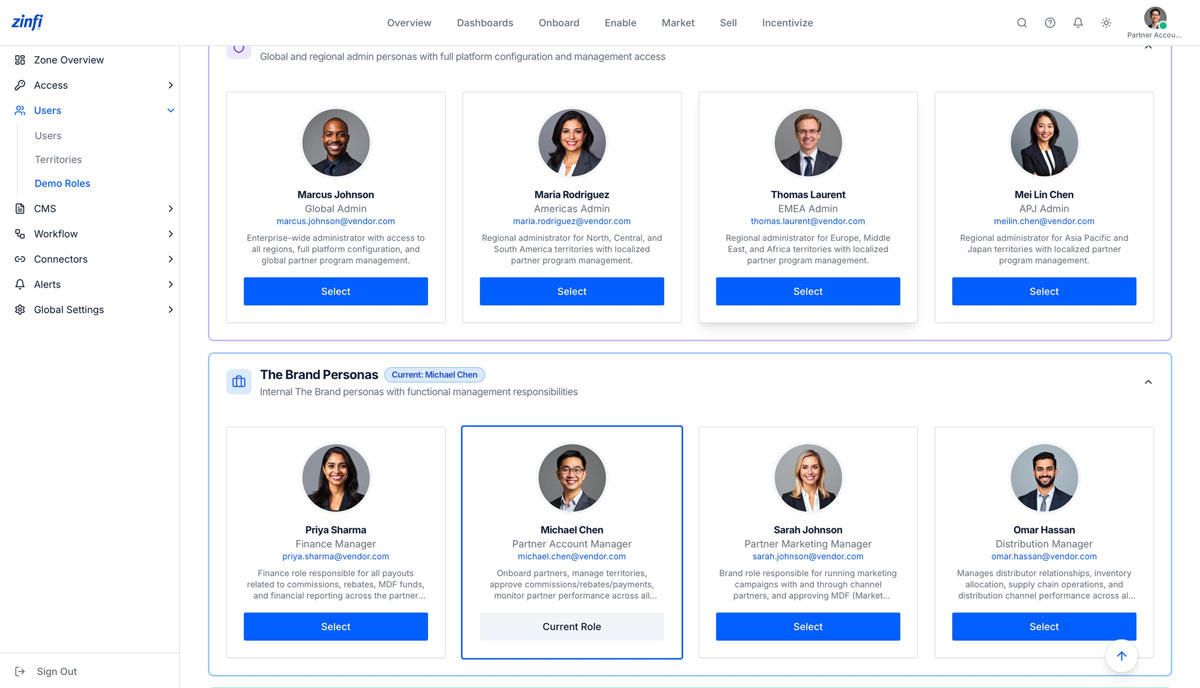
ZINFI’s Demo Roles foundation lets a Global Admin model the real organizational structure of a multi-region channel program — Global, Americas, EMEA, APJ — and create unlimited custom roles on top.
- Unlimited custom roles and permissions to mirror your channel organization without code
- Pre-built persona templates for Global, Americas, EMEA, and APJ regional administrators
- Switch user context instantly to validate permissions, partner views, and field-level access
- Localized partner program management with regional admin scoping baked in
- Single sign-on, MFA, and audit logging applied uniformly across every admin persona
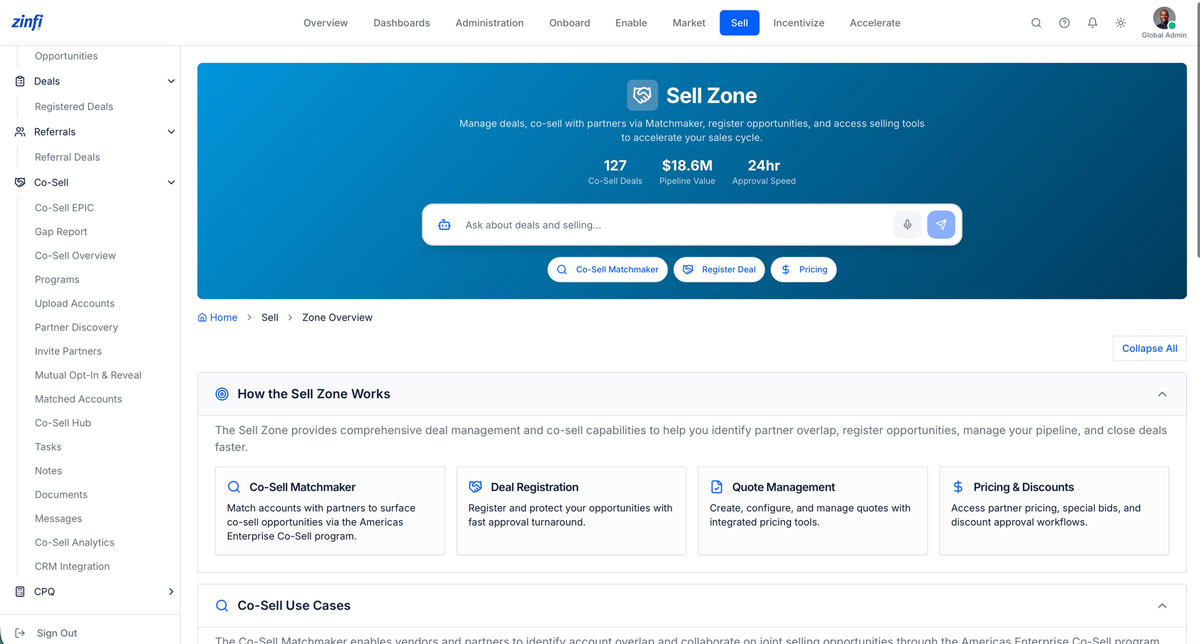
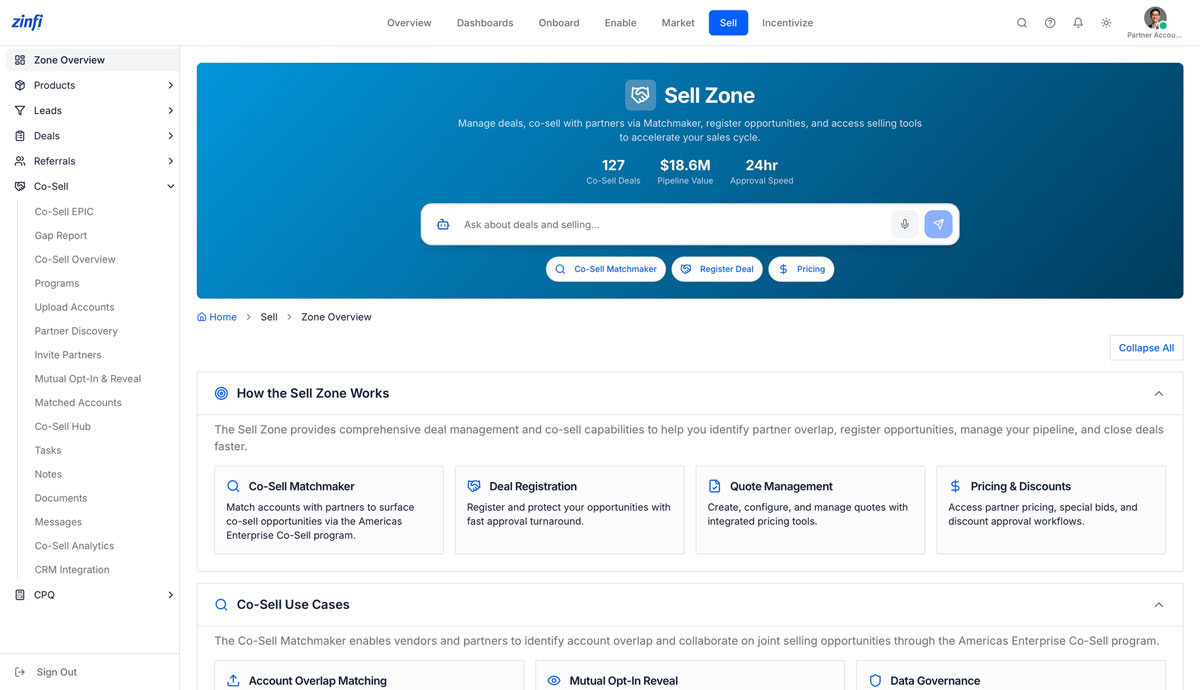
The Co-Sell command center inside the SELL zone
A single landing surface that consolidates pipeline counters, conversational AI, deal-registration entry points, and the full Co-Sell sub-navigation — so a Global Admin can monitor program health and operate the platform from one screen.
- Real-time pipeline counters: Co-Sell Deals, Pipeline Value, average Approval Speed
- Conversational AI assistant for natural-language queries on deals, partners, and pricing
- One-click launchpads for Co-Sell Matchmaker, Deal Registration, and Partner Pricing
- Direct deep-links into Quote Management, Pricing & Discounts, and approval workflows
- Persistent Co-Sell sub-navigation: EPIC, Gap Report, Programs, Hub, Analytics, CRM Integration
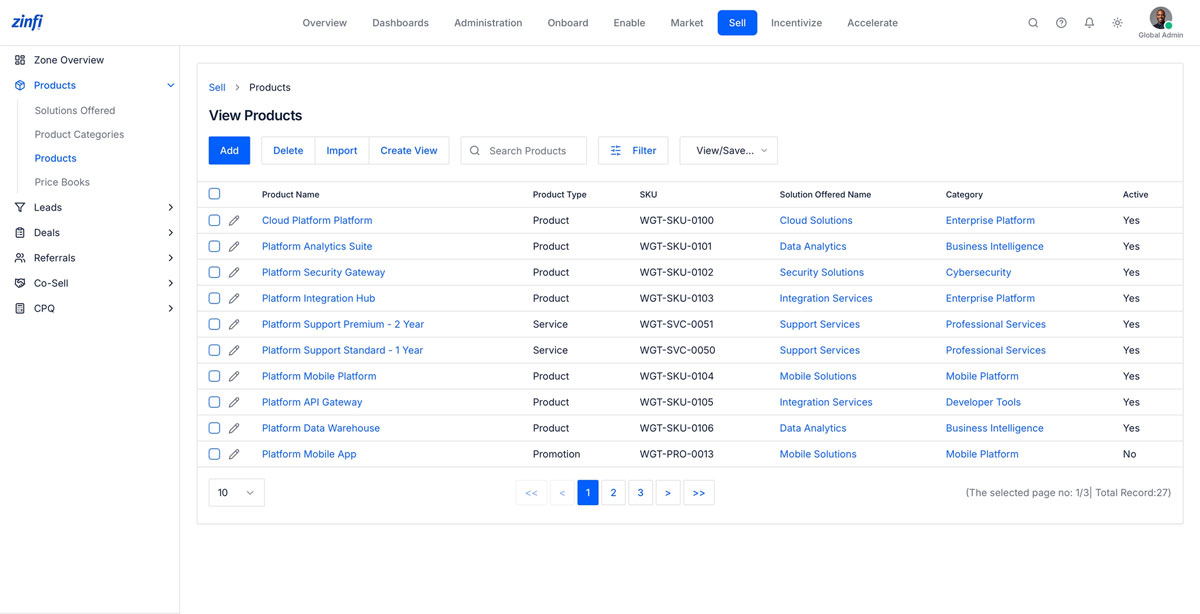
Centralized product master for every co-sell deal
Every co-sell deal, quote, and incentive in the platform resolves back to a single SKU master that the Global Admin curates — so partner-led revenue is always tied to the same products, services, and promotions as direct sales.
- SKU-level catalog spanning Products, Services, and Promotions in one unified table
- Multi-dimensional categorization by Product Type, Solution Offered, and Category
- Bulk import, filter, and saved-view operations for global catalog governance
- Active / inactive status flags to control which SKUs are bookable through partners
- Single source of truth feeding Quote Management, CPQ, and Co-Sell deal registration
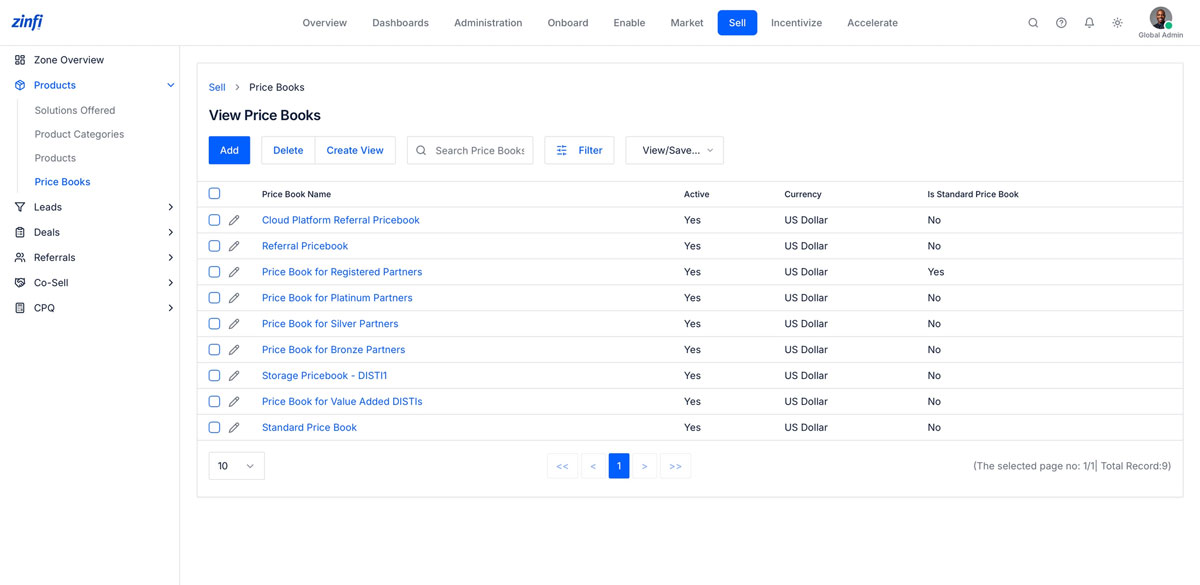
Tier-based pricing books for every partner type
Pricing in a co-sell program rarely fits a single curve. ZINFI lets the Global Admin maintain dedicated price books for each partner tier and route — automatically applied at quote time based on the partner’s program membership.
- Dedicated price books for Platinum, Silver, and Bronze partner tiers — applied automatically at quote time
- Distributor-specific books (Storage, Value-Added DISTI) for two-tier channel models
- Referral and Cloud Platform price books for ecosystem-led co-sell motions
- Multi-currency support with US Dollar and additional currency configurations
- Standard Price Book anchor for list pricing and discount-floor enforcement
Vendor account onboarding into the co-sell program
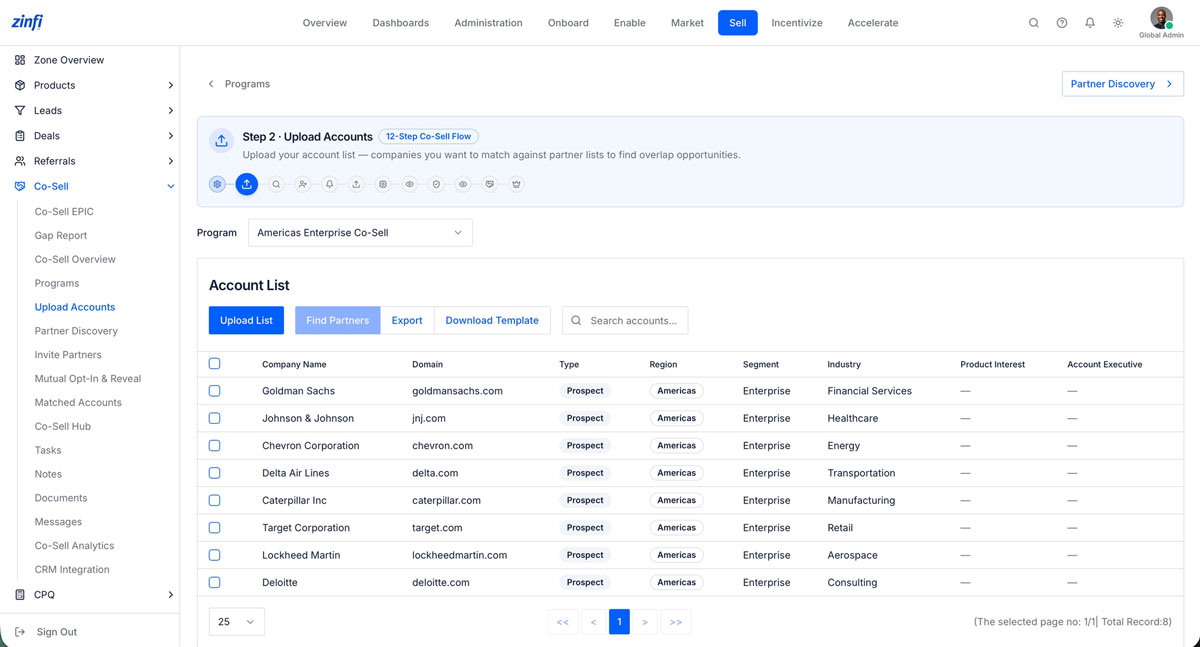
The first operational moment in ZINFI’s 12-Step Co-Sell Flow. The Global Admin uploads the vendor’s prospect, customer, or named-account list into a specific co-sell program — establishing the data foundation against which partners will be matched.
- Step 2 of ZINFI’s guided 12-Step Co-Sell Flow — admins are walked from setup to revenue
- Upload prospect, customer, or named-account lists into specific co-sell programs with one click
- Pre-built CSV template with Type, Region, Segment, Industry, Product Interest, Account Executive fields
- Programs scoped to geography (Americas Enterprise Co-Sell, APJ Enterprise Matchmaker) with isolated lists
- Audit-ready record of every account uploaded — by whom and when — feeding downstream matching
AI-driven partner discovery and match scoring
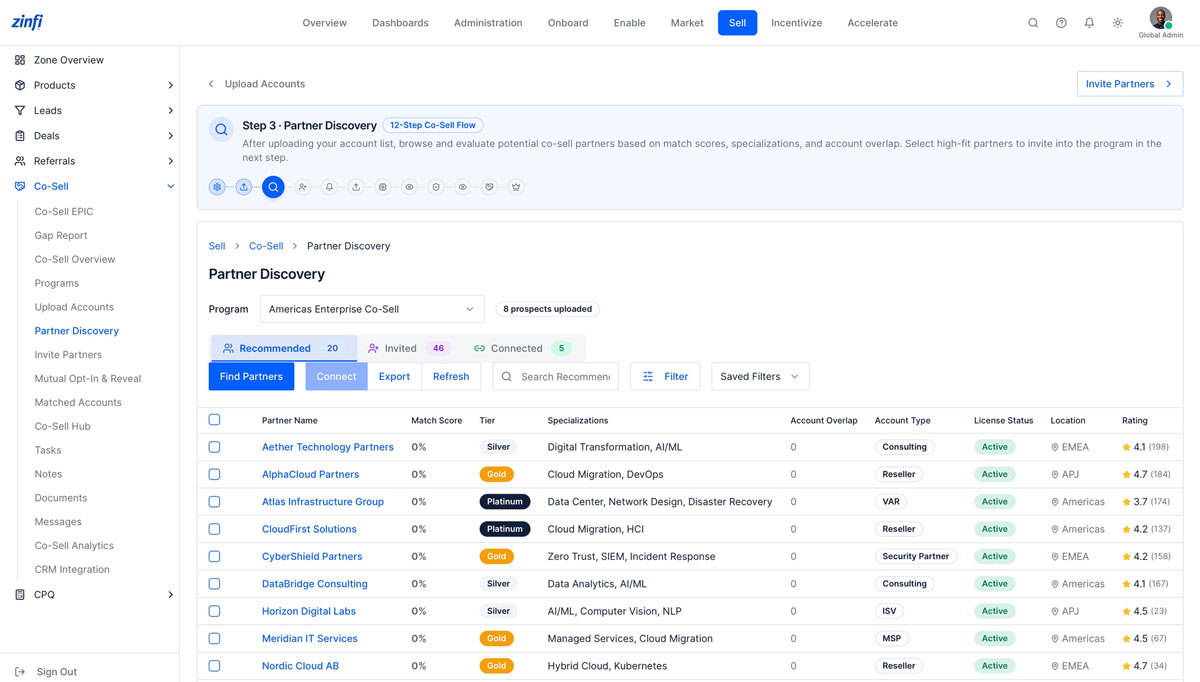
Once the vendor’s account list is loaded, ZINFI’s Partner Discovery engine ranks every available partner by account overlap, specialization fit, tier, and historical performance — so the Global Admin can invite only the highest-fit partners into the program.
- Match-score algorithm ranks partners by account overlap, specialization fit, tier, and history
- Three-state filter — Recommended, Invited, Connected — for full partner-pipeline visibility
- Rich partner cards showing Tier, Specializations, License Status, Location, and Rating
- Filter and saved-view layer for focused discovery (e.g., “EMEA Platinum partners with AI/ML specialization“)
- One-click Connect or Find Partners actions advance qualified partners to invitation
Privacy-first mutual opt-in and reveal engine
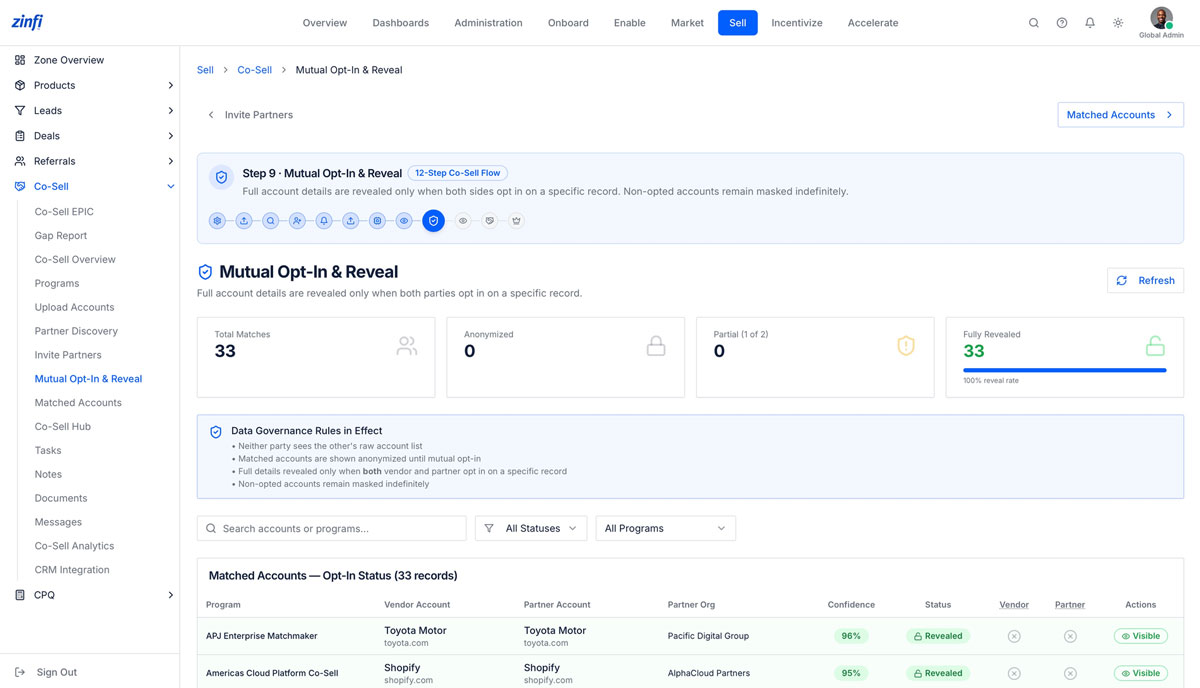
ZINFI eliminates the spreadsheet exchanges and NDA-then-unmask workflows that plague legacy co-sell. Account details are revealed only when both vendor and partner opt in on a specific record — and non-opted accounts remain masked indefinitely.
- Step 9 of the 12-Step Co-Sell Flow — neither party sees raw account data until both opt in on a record
- Live counters for Total Matches, Anonymized, Partial (1-of-2), and Fully Revealed accounts
- Codified Data Governance Rules visible on screen: anonymization defaults, opt-in gating, indefinite masking
- Per-record reveal status with confidence score and vendor / partner consent flags
- Replaces spreadsheet exchanges and one-off NDAs with auditable, granular reveal events
Field-level visibility governance for every matched account
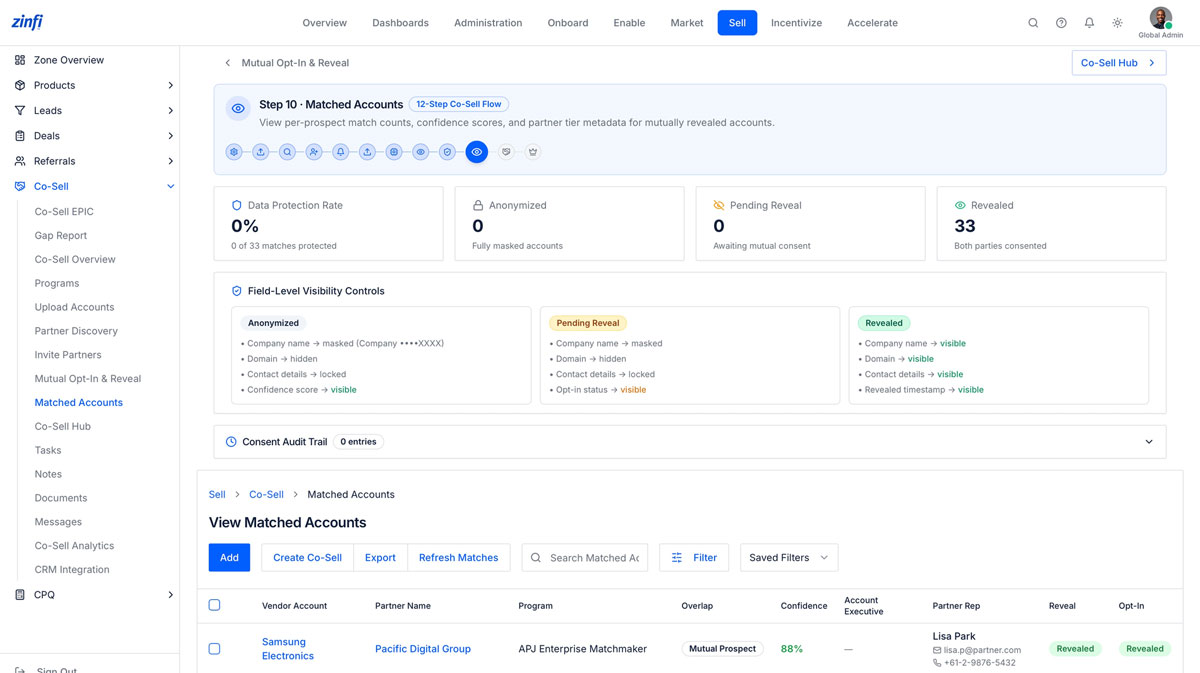
Beyond record-level opt-in, ZINFI enforces field-by-field visibility — Anonymized, Pending Reveal, or Revealed — so legal, privacy, and program-governance teams can codify exactly what partners and vendors see at every stage of the co-sell lifecycle.
- Three-tier visibility model — Anonymized · Pending Reveal · Revealed — with field-by-field controls
- Anonymized: company name masked, domain hidden, contacts locked — only confidence score visible
- Pending Reveal: opt-in status visible to drive next-step action without exposing customer data
- Revealed: full company name, domain, contact details, and reveal timestamp surfaced to both parties
- Built-in Consent Audit Trail satisfies GDPR, CCPA, and enterprise data-sharing review
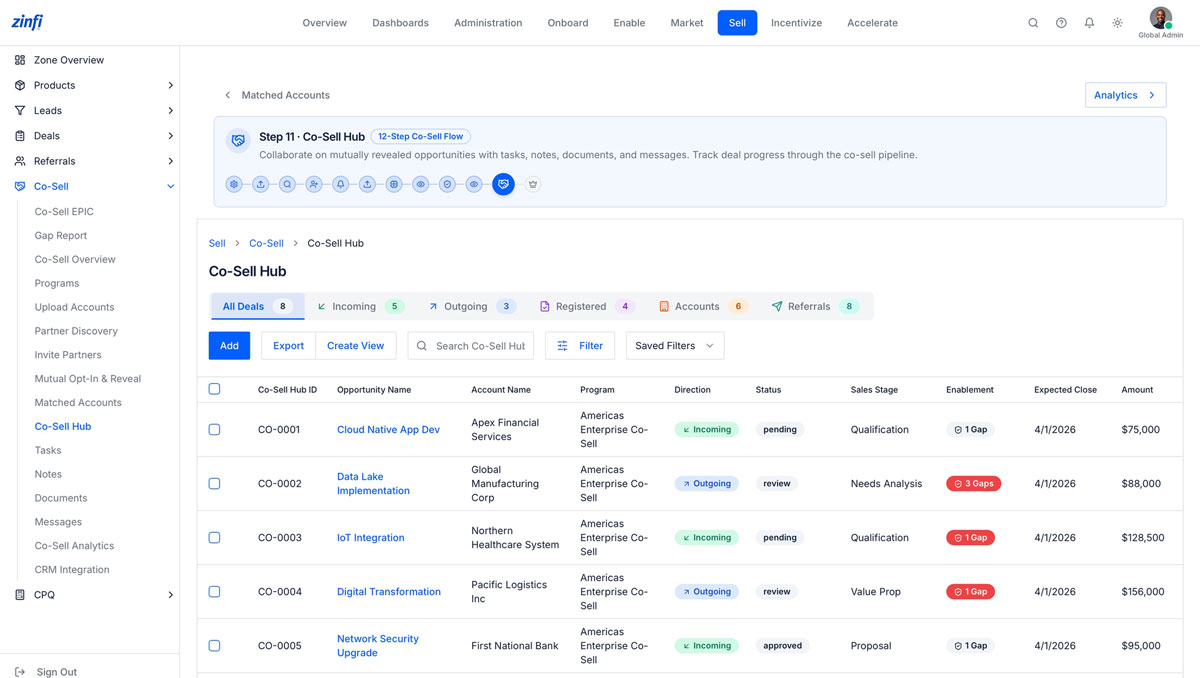
Unified Co-Sell Hub for collaborative deal execution
Once accounts are revealed, the Co-Sell Hub becomes the single workspace where vendor and partner teams collaborate on every joint opportunity — with native tasks, notes, documents, messages, and an Enablement Gap detector that flags missing assets in real time.
- Step 11 of the 12-Step Co-Sell Flow — a single workspace across All / Incoming / Outgoing / Registered / Accounts / Referrals
- Per-deal direction tagging (Incoming, Outgoing) plus status and Sales Stage progression
- Enablement Gap detector flags missing assets, training, or registration steps for each opportunity
- Native Tasks, Notes, Documents, and Messages tied to every Co-Sell Hub record
- Pipeline-grade reporting with Co-Sell Hub ID, Expected Close, Amount, and Program attribution
Partner Account Manager
The operational owner of co-selling inside an assigned territory — onboarding partners, working live deals, approving commissions and rebates, and orchestrating multi-channel collaboration day to day. Where the Global Admin governs the program, the Partner Account Manager runs the pipeline.
The operational owner of partner co-selling in your territory
The Partner Account Manager sits at the center of ZINFI’s Brand Persona model — a defined operational role responsible for partner onboarding, territory management, commission and rebate approvals, and day-to-day partner performance.
- Anchored alongside Finance Manager, Partner Marketing Manager, and Distribution Manager in ZINFI’s Brand Persona model
- Owns partner onboarding, territory management, and commission / rebate / payment approvals for assigned accounts
- Monitors partner performance across MDF, Rebates, Rewards, and Co-Sell in a single workspace
- Persona-scoped permissions inherit from the Global Admin’s role configuration — no policy duplication
- Switch into the PAM context with one click to validate territory views, partner experience, and approval flows
The same SELL zone command center, scoped to your role
When a Partner Account Manager logs in, the SELL zone presents the same pipeline counters, AI assistant, and Co-Sell sub-navigation as the Global Admin sees — but every visible deal, partner, and approval is filtered to the PAM’s territory and permissions.
- Pipeline counters automatically scoped to the PAM’s assigned territory and partners
- One-click launchpads for Co-Sell Matchmaker, Deal Registration, and Pricing filtered to the PAM’s book
- Conversational AI assistant pre-trained on the PAM’s deals, partners, and pending approvals
- Persistent Co-Sell sub-navigation surfaces EPIC, Gap Report, Programs, Hub, Tasks without navigation jumps
- Same governance, same approval workflows, same data model — surfaced through a territory lens
A territory-scoped Co-Sell Zone, purpose-built for the PAM
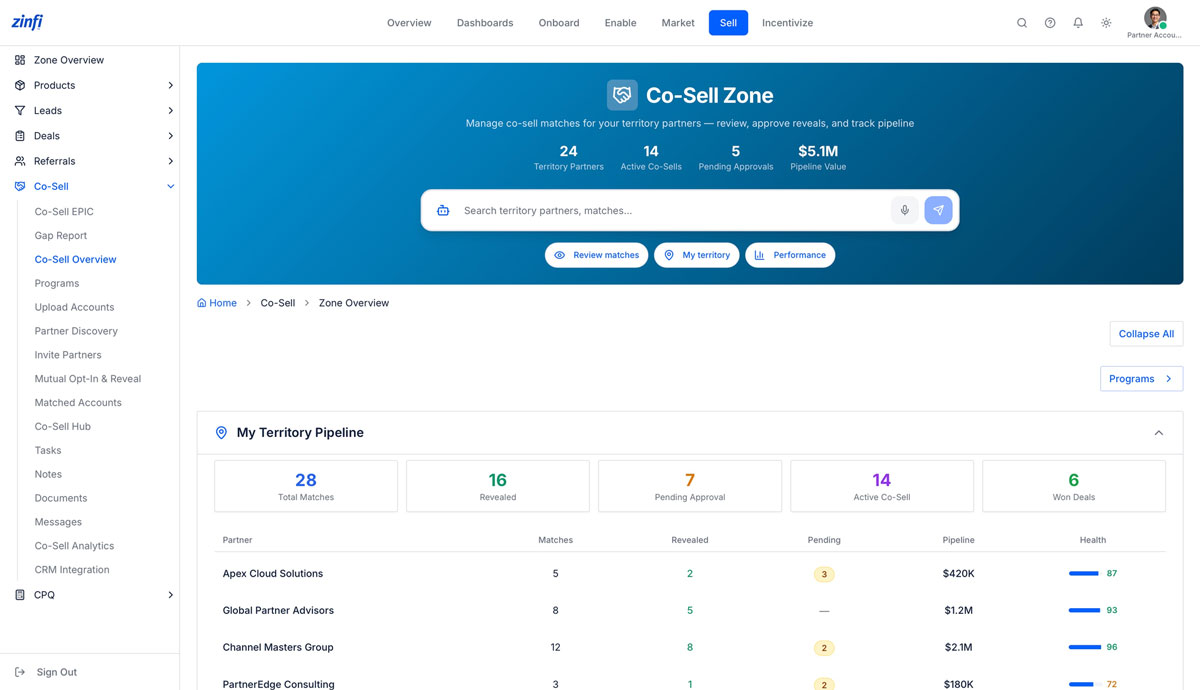
Beyond the SELL zone overview sits the dedicated Co-Sell Zone — a landing surface that aggregates every co-sell signal a Partner Account Manager needs to operate their territory: 24 partners, 14 active co-sells, 5 pending approvals, $5.1M in pipeline, and a partner-by-partner pipeline scorecard refreshed in real time.
- Four headline counters — Territory Partners, Active Co-Sells, Pending Approvals, Pipeline Value — refreshed in real time
- Quick-action shortcuts to Review matches, My territory, and Performance without leaving the page
- “My Territory Pipeline” scorecard with per-partner Matches, Revealed accounts, Pending approvals, Pipeline Value, and Health score
- Conversational AI search bar tuned for territory queries: “which deals close this quarter” or “show pending reveals on Apex“
- Direct deep-link to Programs for territory-level program visibility — the workspace the PAM operates inside
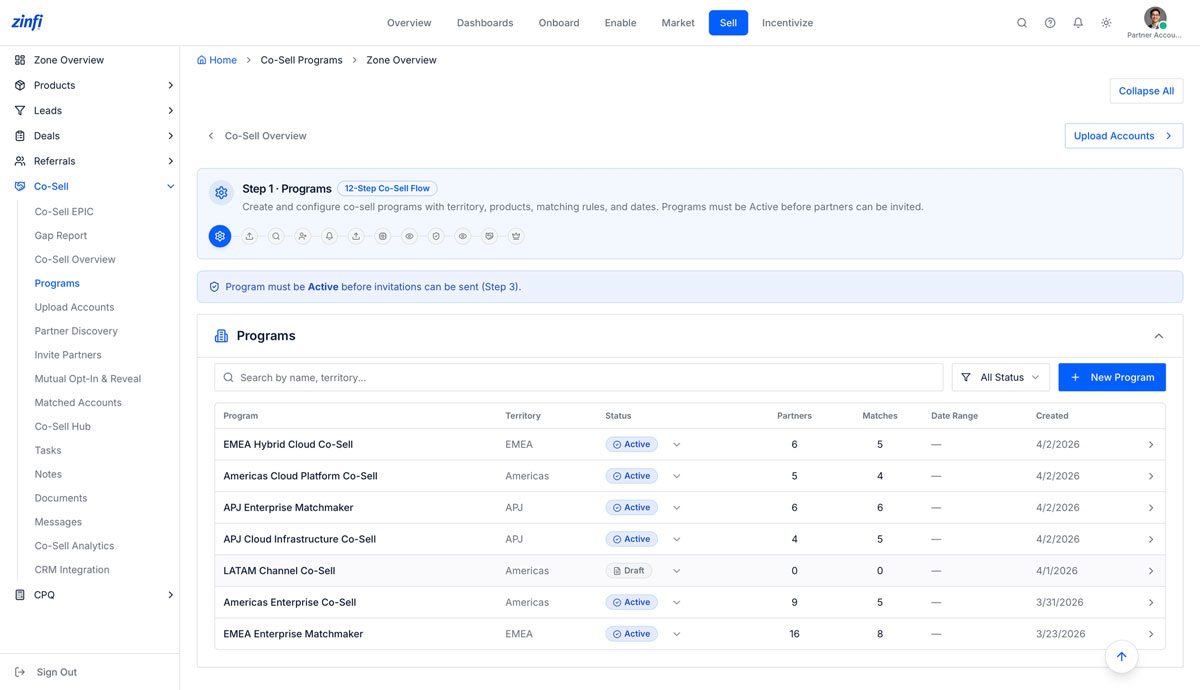
Step 1: territory programs scoped to the PAM’s coverage
ZINFI’s 12-Step Co-Sell Flow begins with Programs. The Partner Account Manager sees only the co-sell programs their territory is associated with — Active and Draft — and can launch new programs for their region without waiting on central admin.
- Step 1 of the 12-Step Co-Sell Flow — the operational entry point for territory PAMs
- Programs auto-filtered to the PAM’s territory: Americas Cloud Platform, APJ Enterprise Matchmaker, EMEA Hybrid Cloud
- Active vs Draft status governance — programs must be Active before partners can be invited (Step 3)
- Real-time program metrics: Partners enrolled, Matches generated, Date Range at-a-glance
- One-click New Program button for PAMs authorized to create territory-specific co-sell motions
Step 2: upload your territory’s named accounts
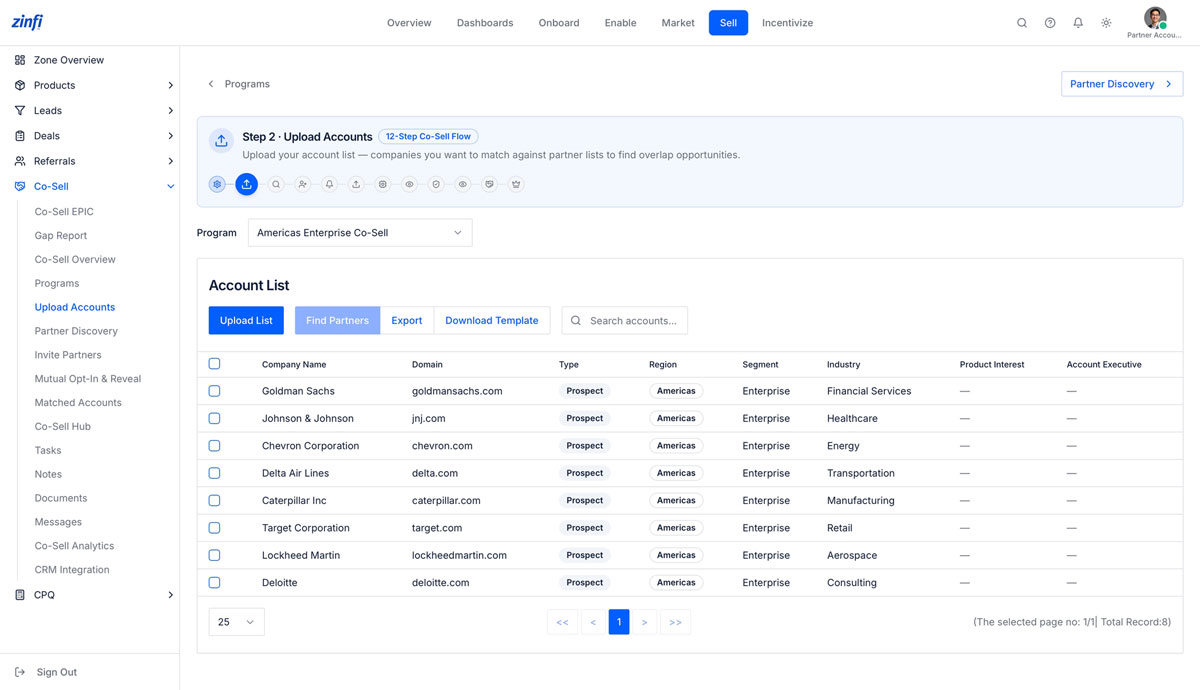
The Partner Account Manager uploads or maintains the named-account list specific to their territory — the seed data that drives partner matching, mutual opt-in, and joint pipeline downstream.
- Step 2 of the 12-Step Co-Sell Flow — the PAM’s account list becomes the basis for territory matching
- Pre-built CSV template with Type, Region, Segment, Industry, Product Interest, Account Executive fields
- Per-program scoping — accounts uploaded to Americas Enterprise Co-Sell stay isolated from APJ Matchmaker
- Audit-ready: every account upload is logged by user, timestamp, and program
- Find Partners action launches Step 3 partner discovery directly against the uploaded list
Step 3: discover the highest-fit partners for your territory deals
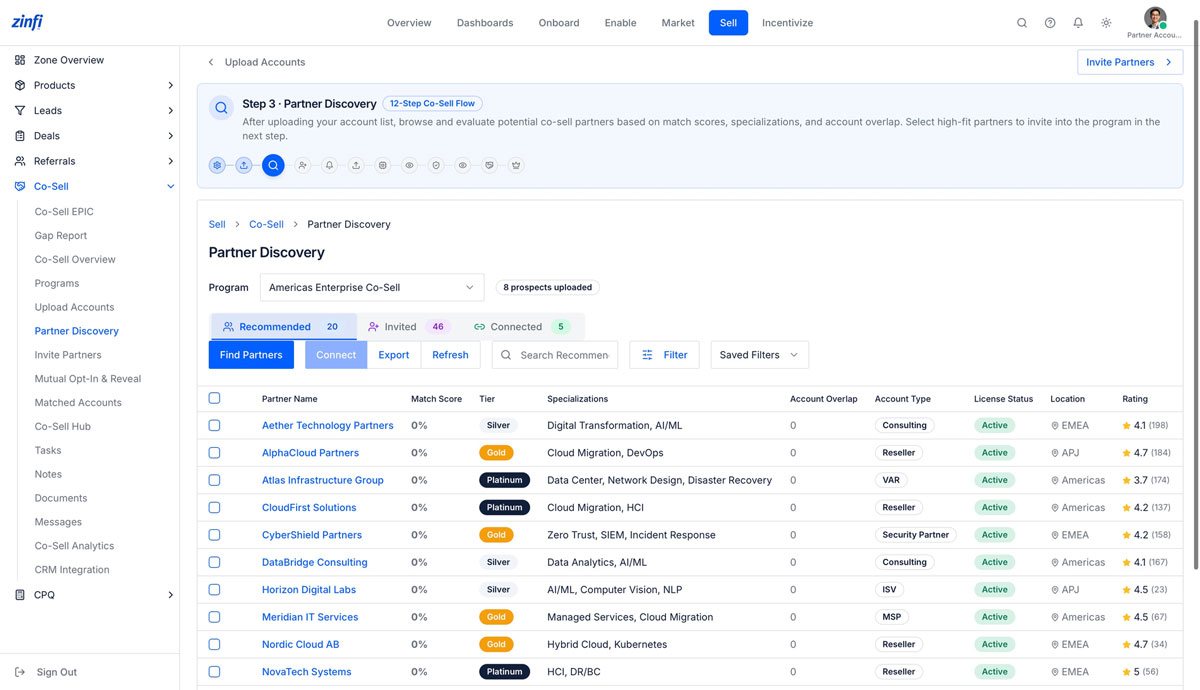
With accounts loaded, the Partner Account Manager evaluates ZINFI’s recommended partners — ranked by match score, specialization fit, tier, and account overlap — and selects the partners worth inviting into their territory’s co-sell programs.
- Match-score algorithm ranks partners by account overlap, specialization, tier, and historical performance
- Three-state filter — Recommended, Invited, Connected — for full territory partner-pipeline visibility
- Rich partner cards showing Tier, Specializations, License Status, Location, and Rating
- Filter and saved-view layer for focused discovery (e.g., “EMEA Platinum partners with Cloud Migration“)
- One-click Connect action advances qualified partners directly from the PAM’s discovery view
Step 9: privacy-first reveal events the PAM can trust
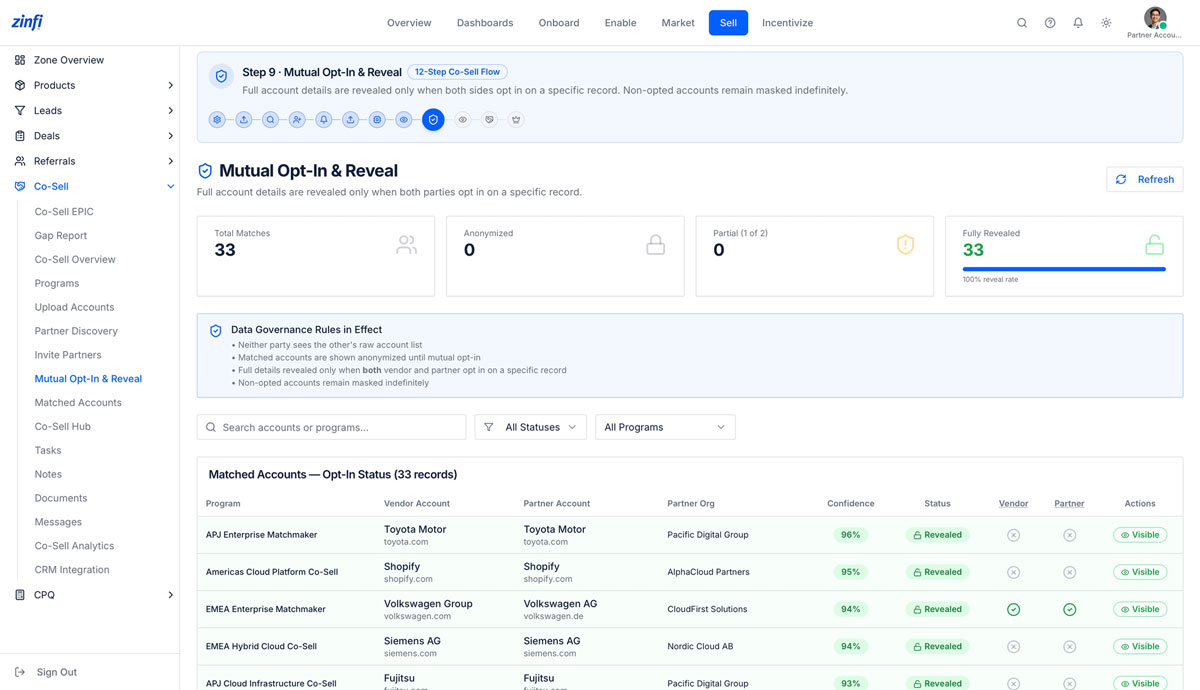
The Partner Account Manager operates inside the same data-governance framework that protects every co-sell program at ZINFI — neither party sees raw data until both opt in, and the PAM only sees Revealed counts for accounts where their territory partner has explicitly consented.
- Step 9 of the 12-Step Co-Sell Flow — the PAM never sees raw partner account data without explicit reveal
- Live counters for Total Matches, Anonymized, Partial (1-of-2), and Fully Revealed scoped to the PAM’s programs
- Data Governance Rules enforced uniformly: anonymization defaults, opt-in gating, indefinite masking of non-opted records
- Per-record reveal status with confidence score and vendor / partner consent flags
- The PAM’s territory metrics roll up to the same 100% reveal-rate auditing the Global Admin governs
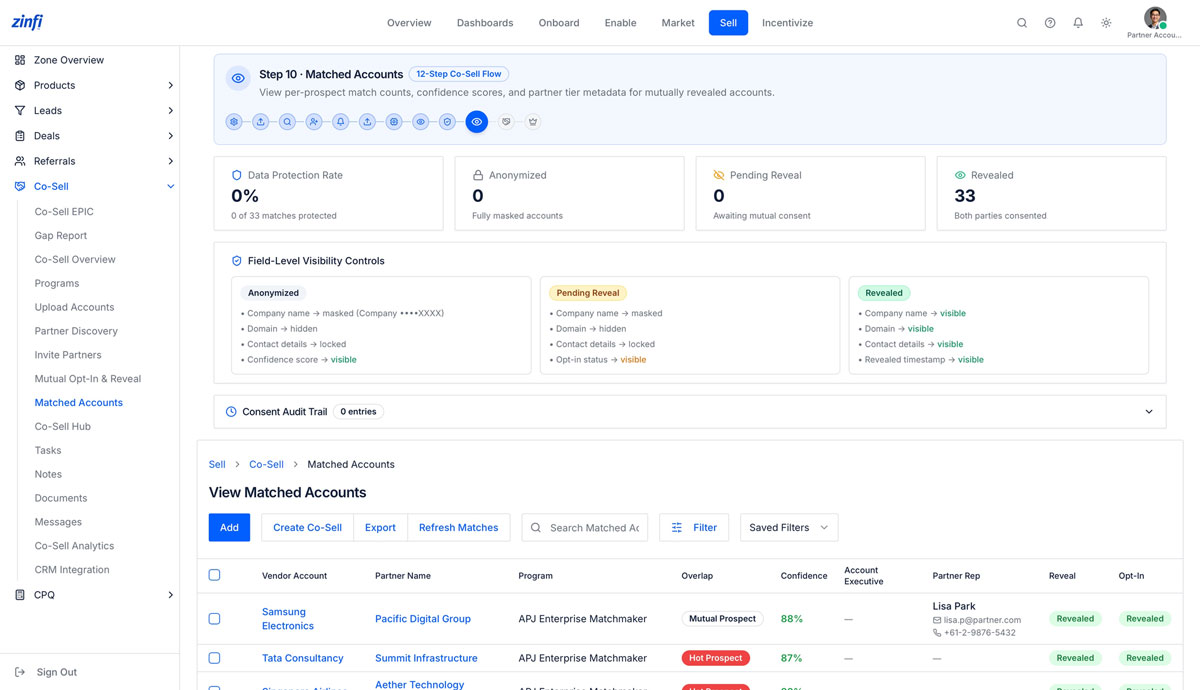
Step 10: matched accounts with confidence scoring and partner-rep handoff
Once accounts are mutually revealed, the Partner Account Manager sees the matched-account roster with confidence scores, overlap classification (Mutual Prospect, Hot Prospect), and direct partner-rep contact details — the bridge from data match to live conversation.
- Three-tier visibility model — Anonymized, Pending Reveal, Revealed — applied to every territory match
- Field-level controls govern what the PAM sees at each stage: company name, domain, contacts, reveal timestamp
- Overlap classification: Mutual Prospect, Hot Prospect, or Mutual Customer for prioritization
- Partner Rep contact card with name, email, and direct phone surfaced inline (e.g., Lisa Park · lisa.p@partner.com)
- Create Co-Sell action takes the PAM directly from a matched account into a registered Co-Sell deal
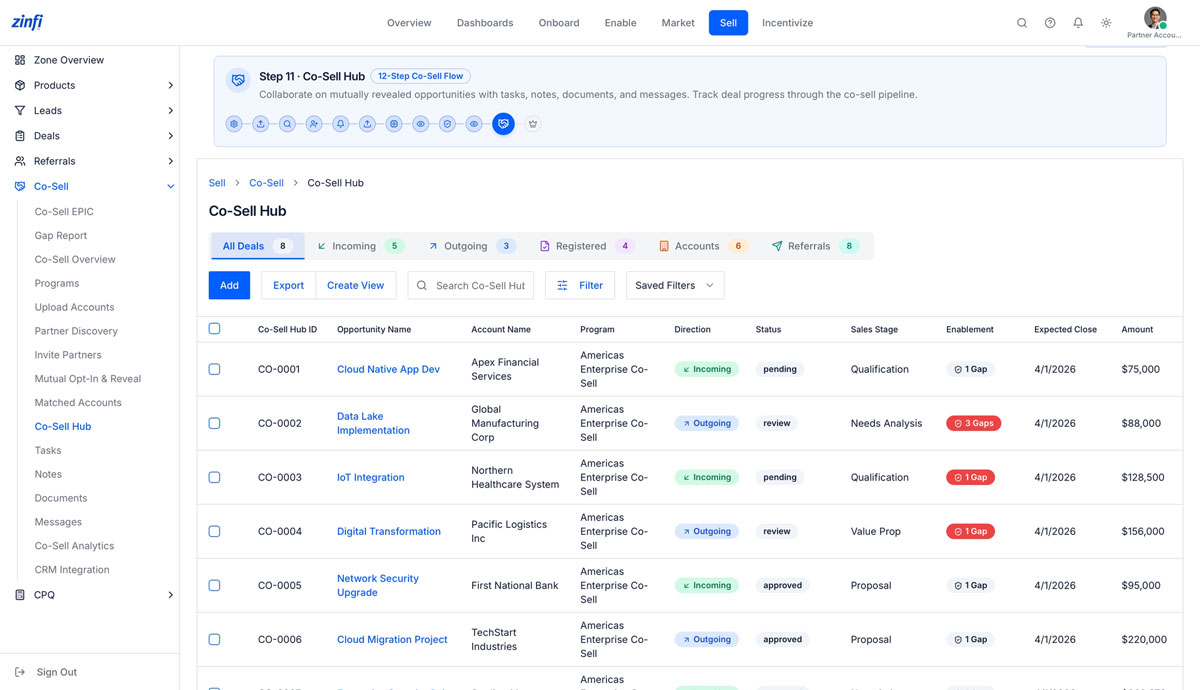
Step 11: the PAM’s deal cockpit for every joint opportunity
The Co-Sell Hub becomes the Partner Account Manager’s working pipeline — every revealed opportunity in their territory, organized by direction (Incoming, Outgoing, Registered), with sales stage, enablement gaps, expected close, and amount visible at a glance.
- Step 11 of the 12-Step Co-Sell Flow — a single workspace across All / Incoming / Outgoing / Registered / Accounts / Referrals
- Per-deal direction tagging (Incoming, Outgoing) plus status (pending, review, approved) and Sales Stage
- Enablement Gap detector flags missing assets, training, or registration steps with red 1-Gap / 3-Gap chips
- Native Tasks, Notes, Documents, and Messages anchored to every Co-Sell Hub record (next sections)
- Pipeline-grade reporting with Co-Sell Hub ID, Expected Close, Amount, and Program attribution
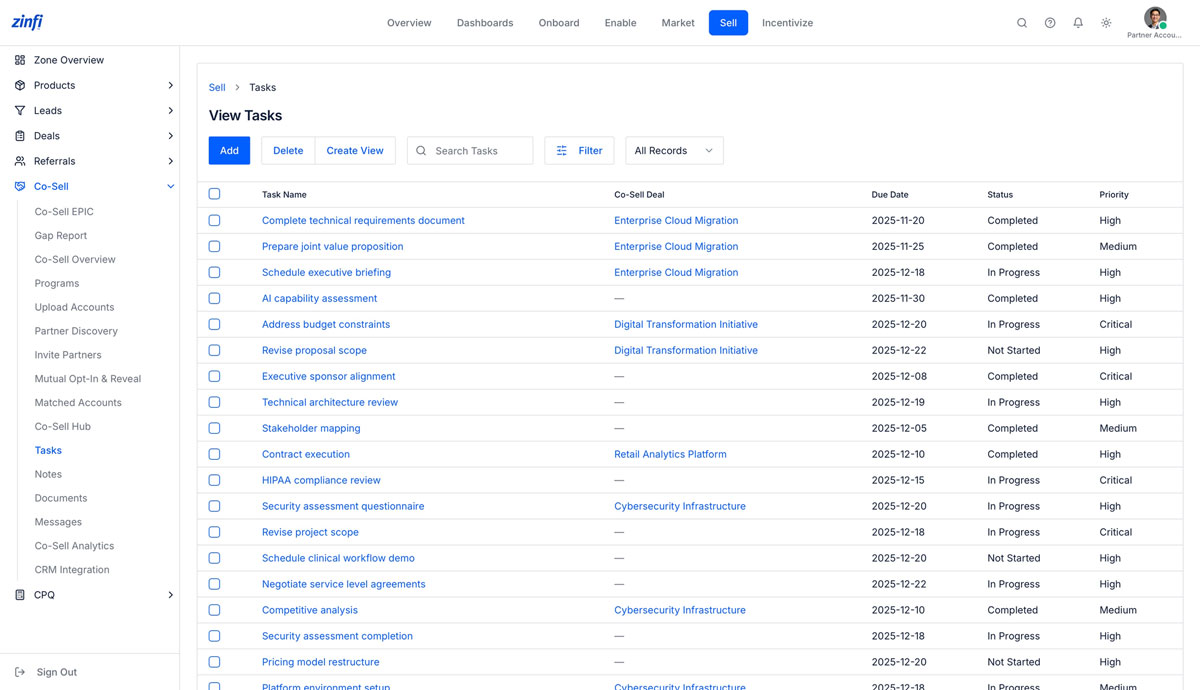
Deal-anchored tasks that drive co-sell execution forward
Every Co-Sell deal in the PAM’s hub generates a stream of execution tasks — technical requirements, joint value proposition prep, executive briefings, security assessments — each with due date, status, and priority, all inside ZINFI.
- Tasks anchored to specific Co-Sell deals (Enterprise Cloud Migration, Digital Transformation Initiative, Cybersecurity Infrastructure)
- Lifecycle states: Not Started, In Progress, Completed with priority tags (Critical, High, Medium)
- Due-date tracking with overdue alerts and automated reminders to vendor and partner sales teams
- Tasks can be created independently of a deal for territory-level work (AI capability assessment, executive sponsor alignment)
- Filter, search, and saved-view layer for managing dozens of concurrent tasks across a territory
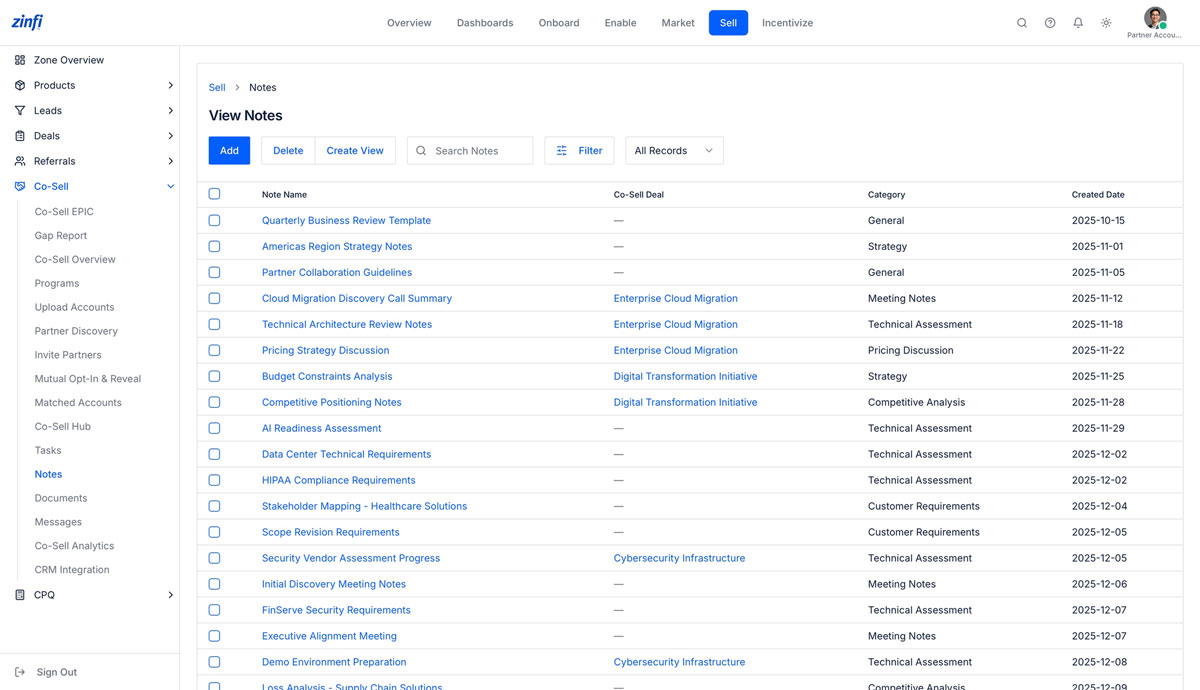
A categorized notes layer for every co-sell conversation
ZINFI Notes capture the institutional memory of every co-sell deal — meeting summaries, technical assessments, pricing discussions, competitive intelligence, and stakeholder maps — categorized and linked back to the originating deal so context never gets lost in email.
- Notes categorized by purpose: Meeting Notes, Strategy, Technical Assessment, Pricing Discussion, Competitive Analysis, Customer Requirements, General
- Each note anchored to a specific Co-Sell deal for full context
- Reusable templates (Quarterly Business Review Template, Partner Collaboration Guidelines) standardize note quality
- Created-date timeline preserves the full conversation trail of a deal from discovery to close
- Search, filter, and saved-view layer for retrieving notes across hundreds of deals and dozens of partners
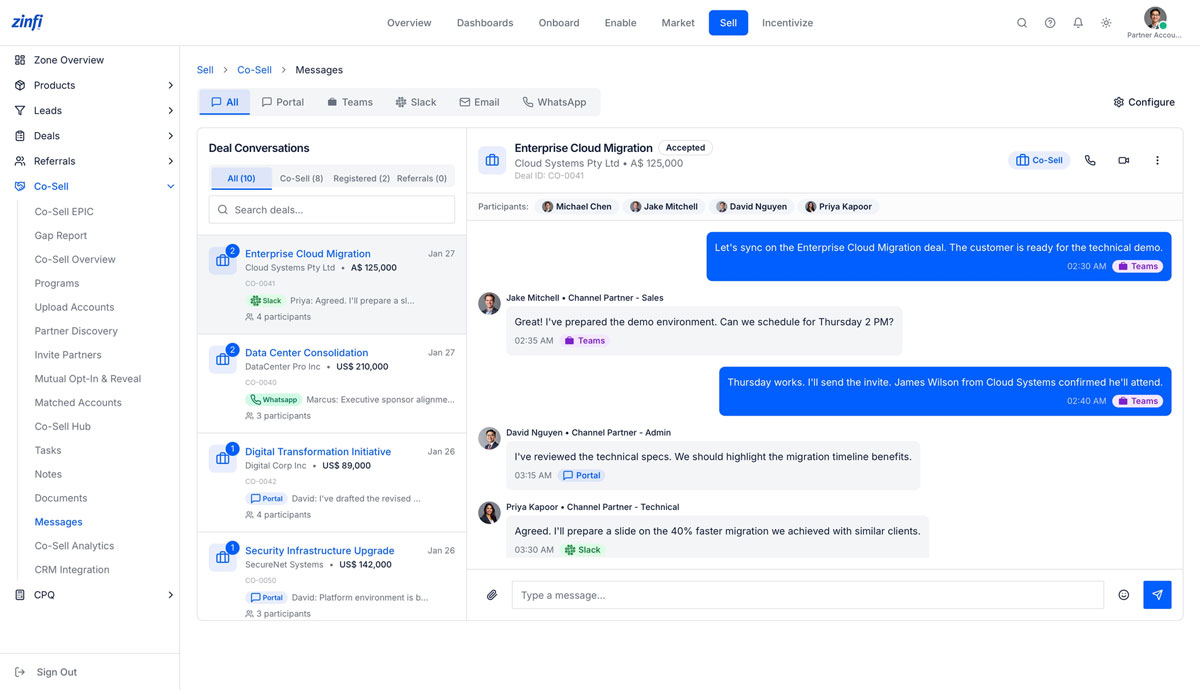
Unified multi-channel messaging — Portal, Teams, Slack, Email, WhatsApp
Co-sell conversations don’t live in one channel — they sprawl across Microsoft Teams, Slack, email, WhatsApp, and the partner portal. ZINFI Messages consolidates every thread into a single deal-anchored conversation, with channel attribution preserved on every message.
- Five-channel unification: Portal, Teams, Slack, Email, WhatsApp — every message visible inside the deal record
- Deal-anchored conversations with full participant roster (vendor + channel partner sales, admin, technical roles)
- Channel attribution preserved on every message (Teams, Slack, Portal pills) for audit-ready visibility
- Native video and voice call launch from the deal conversation header
- Configure action lets the PAM control which channels are surfaced and which integrations are active
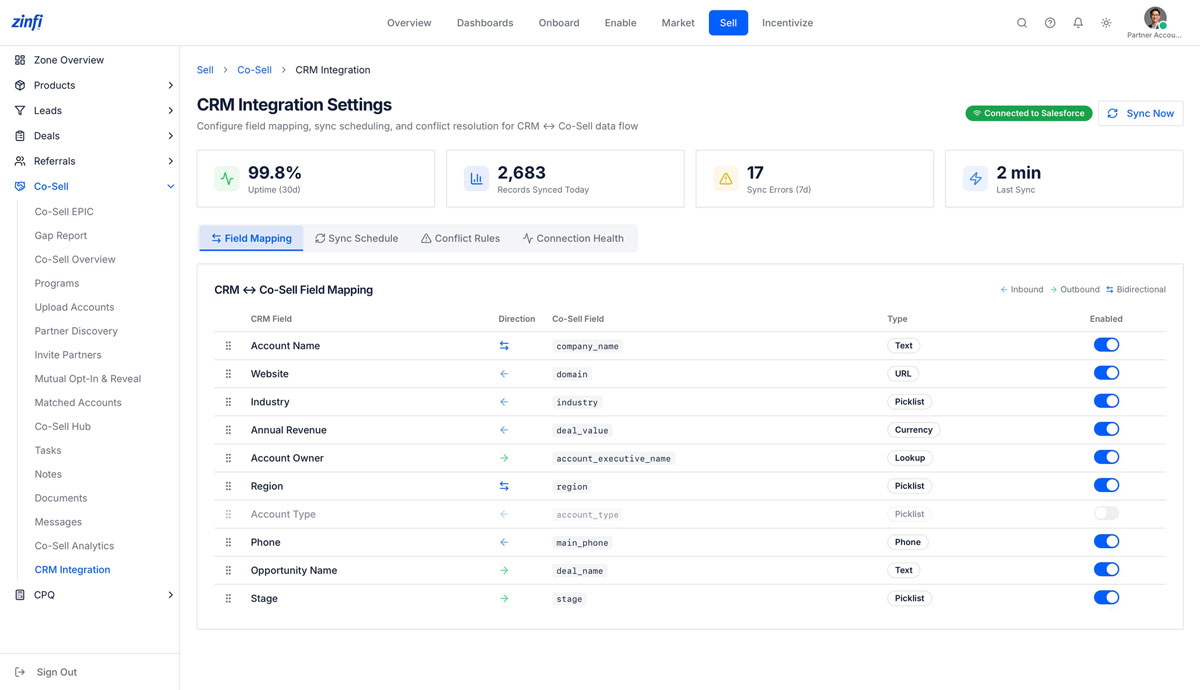
Bidirectional CRM sync — every field, every direction, governed
ZINFI’s Co-Sell module never operates as an island. The Partner Account Manager has full visibility into the bidirectional sync between their CRM and ZINFI Co-Sell — field-by-field mapping, sync schedule, conflict rules, and connection health, with sub-2-minute sync latency and 99.8% uptime.
- Native bidirectional sync with Salesforce, HubSpot, Microsoft Dynamics 365, Oracle, and SAP
- Field-level direction control: Inbound (CRM → Co-Sell), Outbound (Co-Sell → CRM), or Bidirectional per field
- Real-time health metrics: 99.8% uptime, 2,683 records synced today, sub-2-minute sync latency
- Four configuration tabs — Field Mapping, Sync Schedule, Conflict Rules, Connection Health — for full PAM-managed governance
- Type-aware mapping (Text, URL, Picklist, Currency, Lookup, Phone) with per-field enable / disable toggles
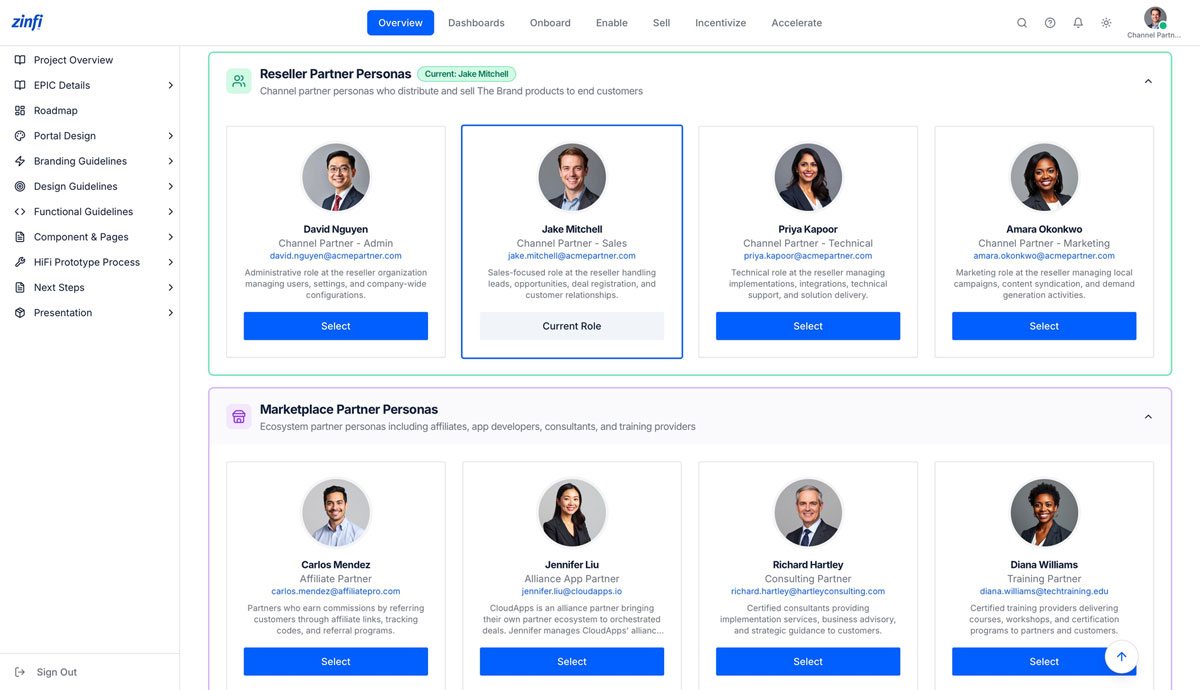
Channel Partner — Sales
The reseller-side sales rep working live deals through the vendor’s co-sell program. Where the Global Admin governs the program and the Partner Account Manager runs the territory, the Channel Partner — Sales rep is the one bringing existing customer relationships into the joint pipeline, opting in selectively, and earning commission and rebate on every closed-won deal.
The reseller persona model — built for every role inside your channel partner organization
ZINFI doesn’t treat “partner” as a single role. The platform recognizes that a reseller organization has Sales, Admin, Technical, and Marketing functions — and that ecosystem partners (Affiliate, Alliance, Consulting, Training) operate differently. The Channel Partner — Sales persona is purpose-built for the rep working live deals.
- Persona model spans Reseller roles (Admin, Sales, Technical, Marketing) and Marketplace roles (Affiliate, Alliance, Consulting, Training)
- The Sales persona is purpose-built for reps handling leads, opportunities, deal registration, and customer relationships
- Persona-scoped permissions inherit from the vendor’s program configuration — no double-booking of policy
- Side-by-side persona comparison helps reseller orgs assign the right ZINFI access to the right team member
- Switch into the Sales persona with one click to validate the rep’s day-to-day experience
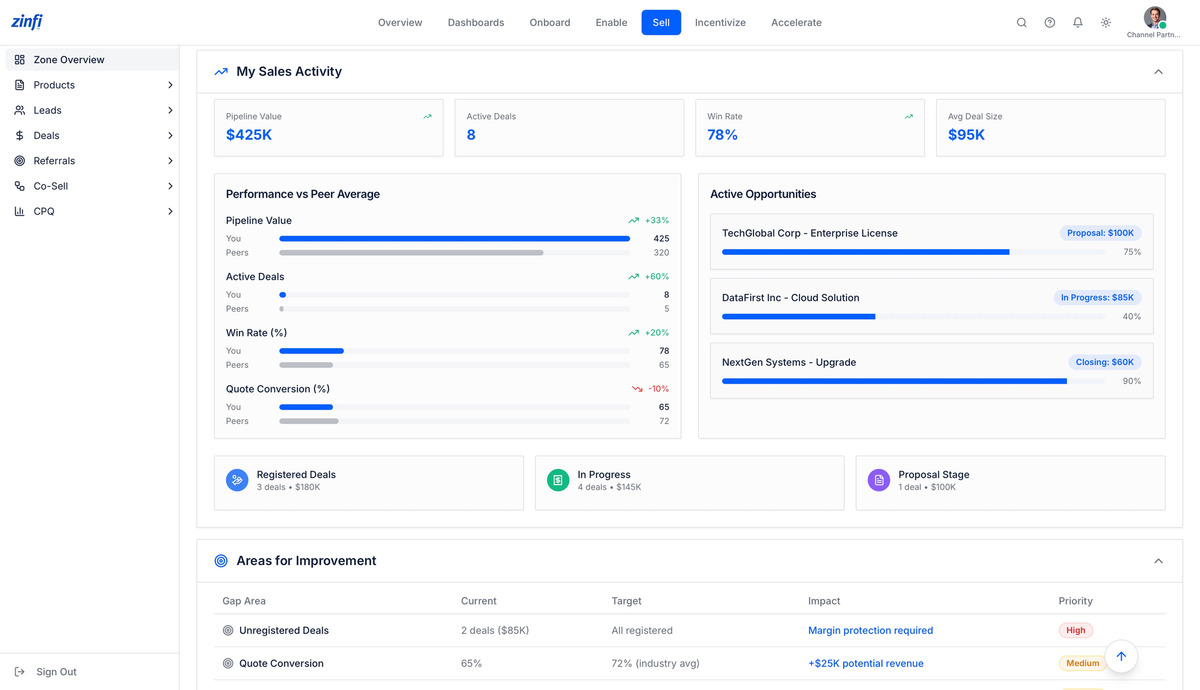
A sales rep’s home base — pipeline, peer benchmarks, and active opportunities
When a reseller sales rep logs in, ZINFI presents a dashboard purpose-built for the rep’s day-to-day work — pipeline value, active deals, win rate, and average deal size, plus a peer-comparison view that benchmarks the rep against their team and surfaces concrete areas for improvement.
- Four headline counters: Pipeline Value, Active Deals, Win Rate, and Avg Deal Size — refreshed in real time
- Performance vs Peer Average across Pipeline Value, Active Deals, Win Rate, and Quote Conversion
- Active Opportunities panel highlighting top deals (TechGlobal Corp Enterprise License at Proposal $100K)
- Areas for Improvement detector flags Unregistered Deals, Quote Conversion gaps, and other revenue-leak risks
- Single-click navigation to Deals, Referrals, Co-Sell, and CPQ modules without leaving the dashboard
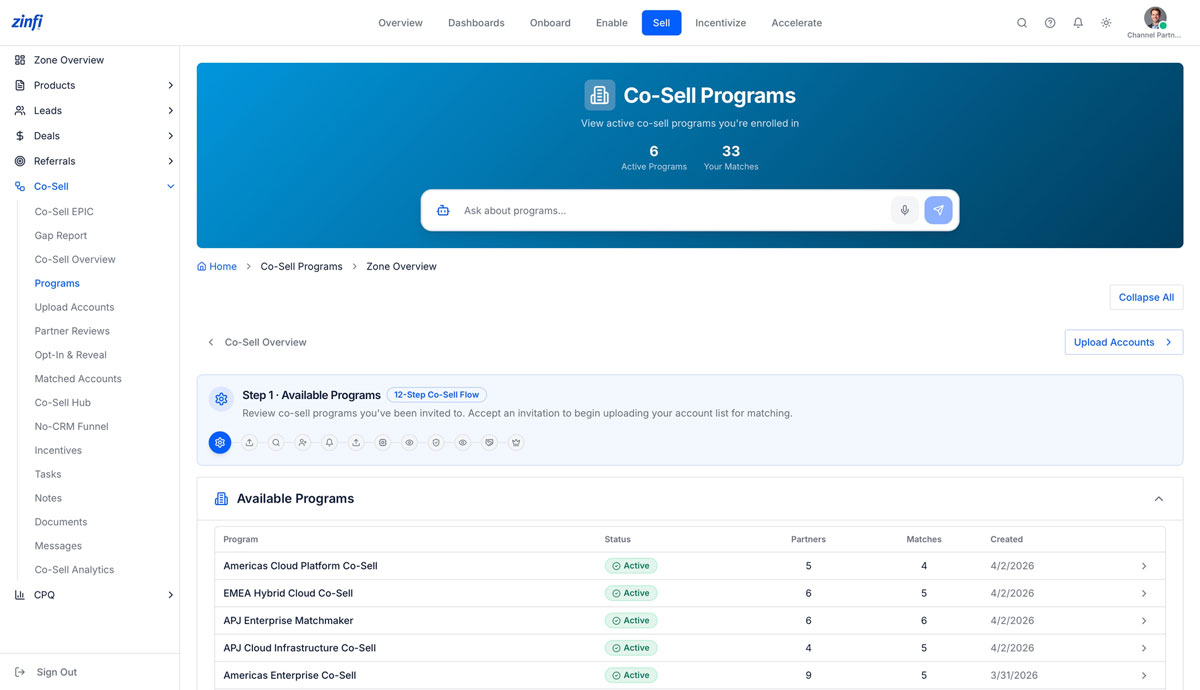
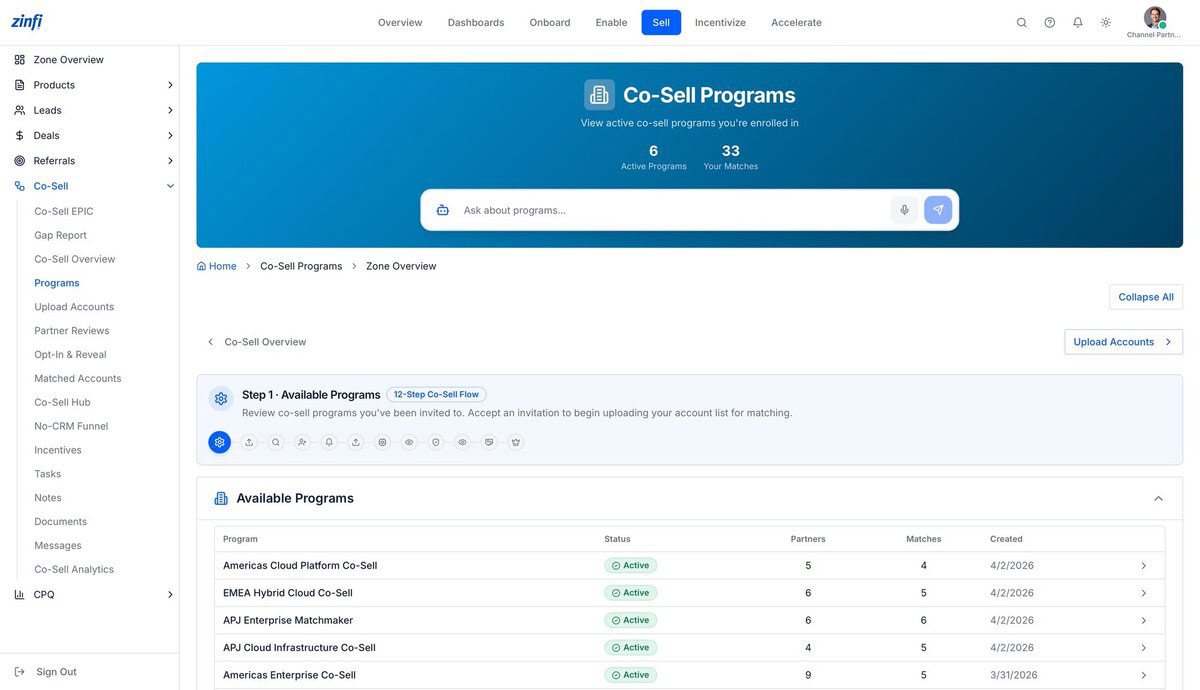
Step 1: see every co-sell program you’ve been invited to
Channel partner sales reps don’t configure programs — they accept invitations to vendor-run programs. ZINFI’s Co-Sell Programs view lists every program the rep is enrolled in, with active status, partner count, match count, and date range.
- Step 1 of the 12-Step Co-Sell Flow — review co-sell programs you’ve been invited to
- Two headline counters: Active Programs and Your Matches across all enrolled programs
- Per-program rollups: Status, Partners, Matches, Created date — with one-click drill into each
- Conversational AI assistant for natural-language queries: “show me my Americas programs“
- Programs must be Active before partners can be invited or matched (governance built into the flow)
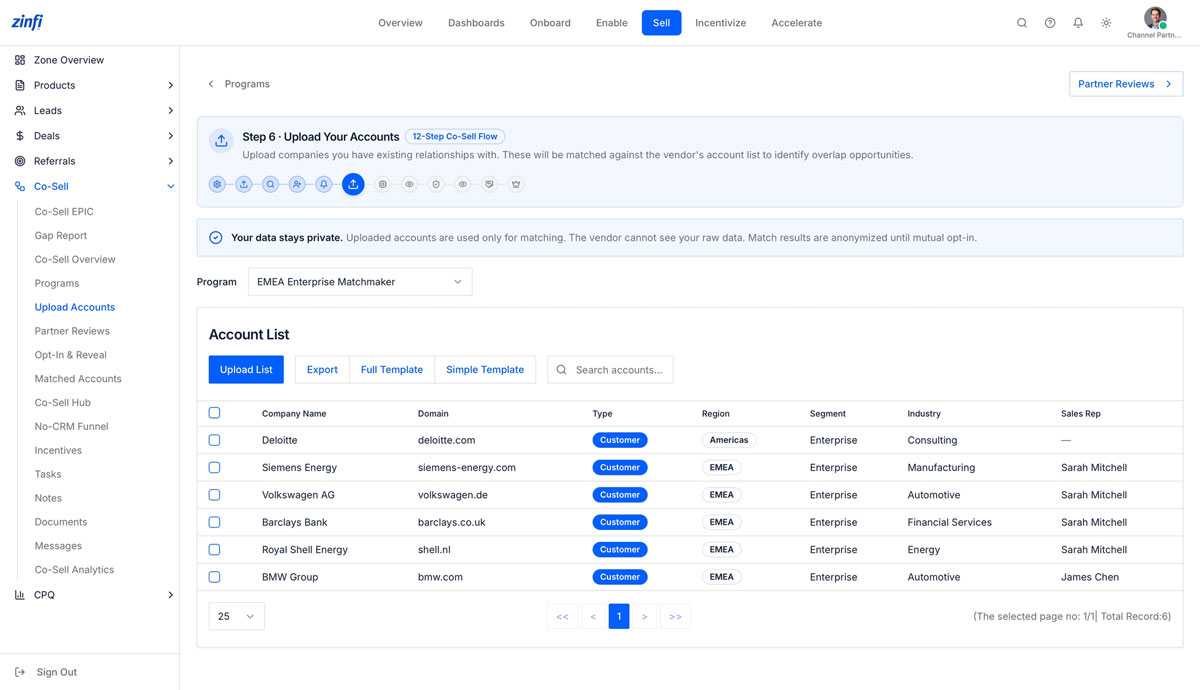
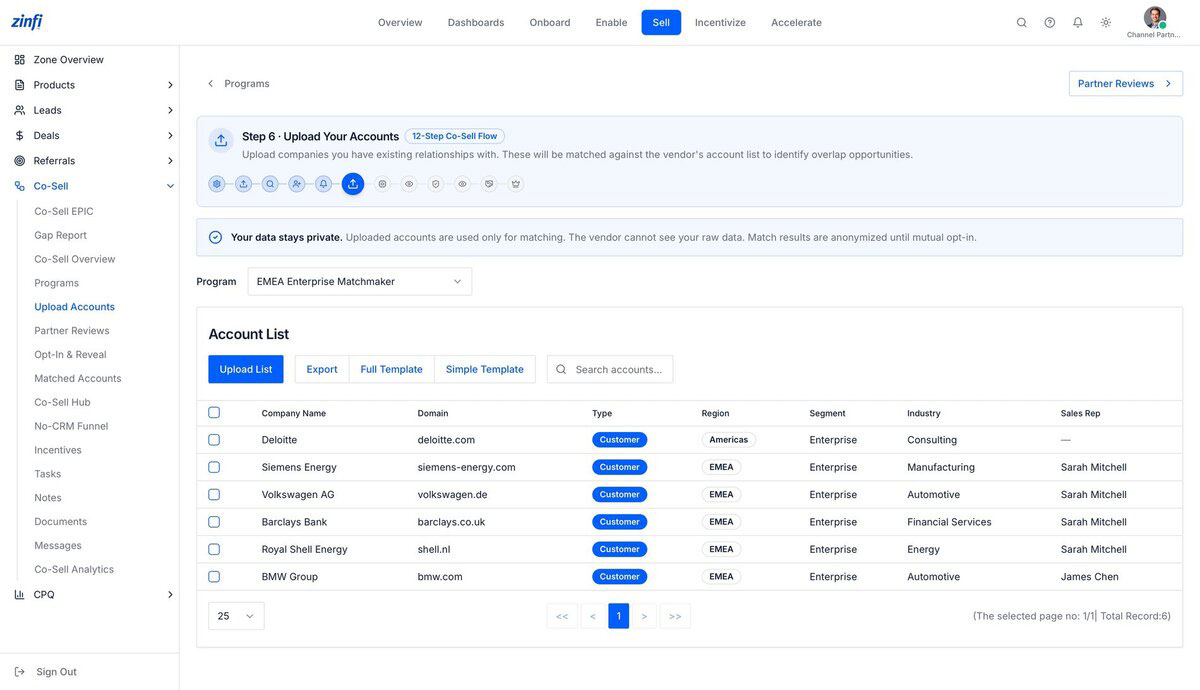
Step 6: upload your existing customer relationships — privately
This is where ZINFI’s privacy-first architecture matters most for a channel partner. The sales rep uploads their own customer list to be matched against the vendor’s account list — and ZINFI guarantees that the vendor never sees the rep’s raw account data, only matches.
- Step 6 of the 12-Step Co-Sell Flow — upload your own customer relationships for matching against the vendor’s list
- “Your data stays private” disclosure surfaced inline: vendor cannot see raw partner data; matches anonymized until mutual opt-in
- Pre-built CSV templates (Full and Simple) for fast or detailed account onboarding
- Per-account fields: Type (Customer / Prospect), Region, Segment, Industry, Sales Rep
- Audit-ready: every upload logged with timestamp, uploader, and program for partner-side governance
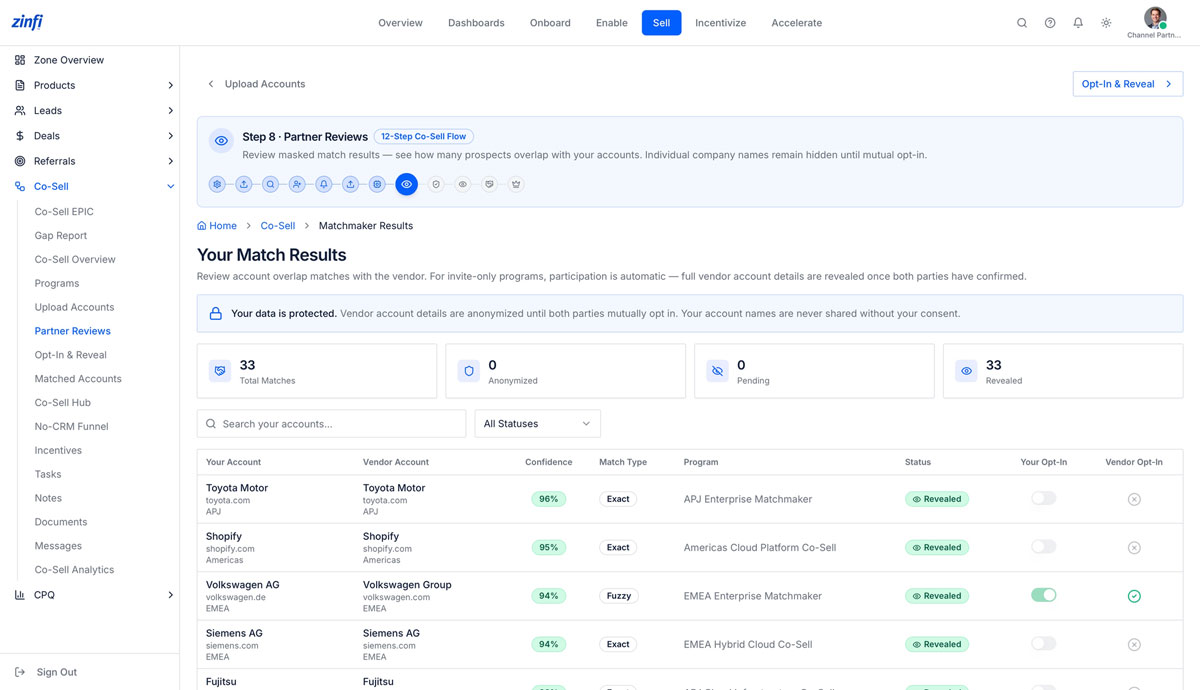
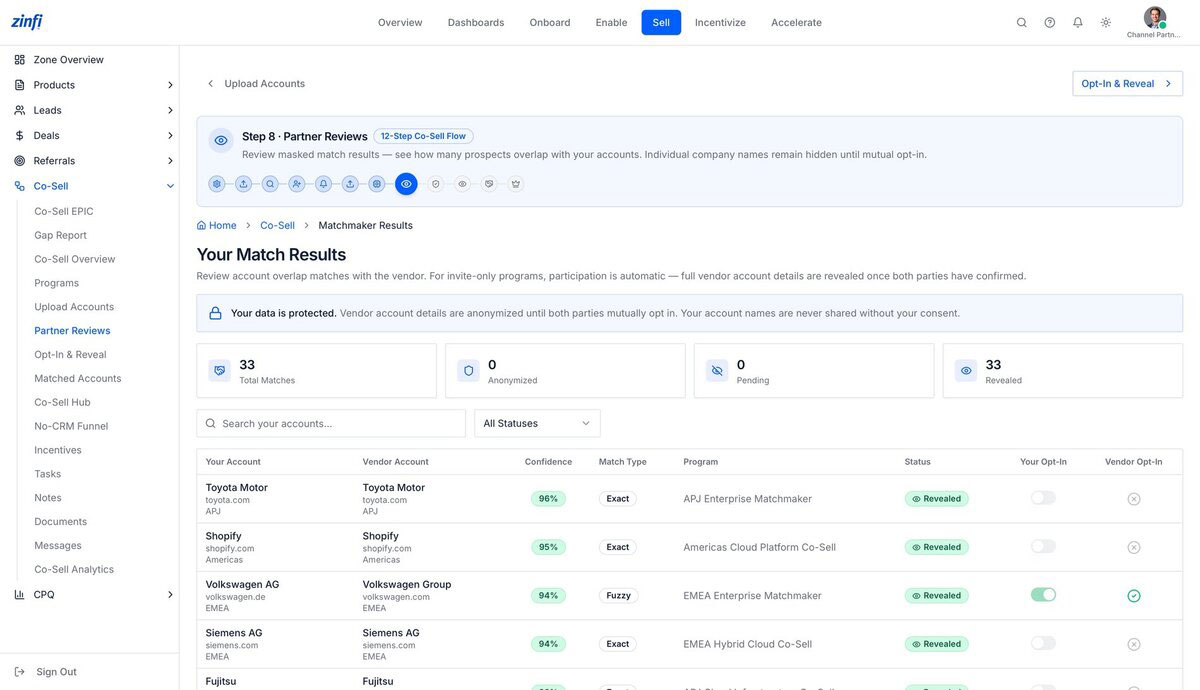
Step 8: review masked match results — see overlap without exposing customers
After ZINFI’s matching engine runs, the channel partner sees a Partner Reviews screen with masked match results — overlap counts, confidence scores, and program attribution — without exposing individual vendor customer names until both parties opt in.
- Step 8 of the 12-Step Co-Sell Flow — review masked match results before any data exchange
- Live counters for Total Matches, Anonymized, Pending, and Revealed scoped to the partner’s account list
- Match Type classification: Exact, Fuzzy, or Domain-based — with confidence percentage per record
- “Your data is protected” disclosure on every screen: vendor account names never shared without consent
- Per-record Your Opt-In and Vendor Opt-In toggles — both sides must agree for full reveal
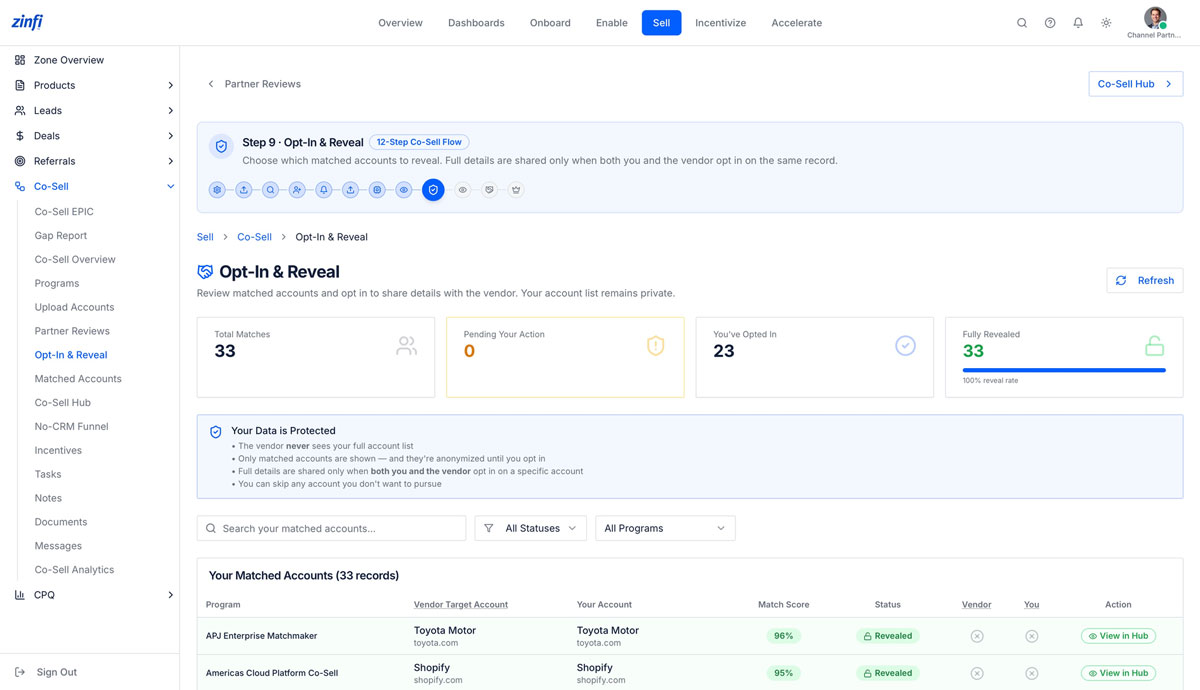
Step 9: opt in selectively — your account list stays private
The Opt-In & Reveal screen is where the channel partner decides which matched accounts they’re willing to reveal to the vendor. Even after opting in, the partner’s full account list remains private — only the specific opted-in records become visible to both parties.
- Step 9 of the 12-Step Co-Sell Flow — review matched accounts and opt in to share details with the vendor
- Live counters: Total Matches, Pending Your Action, You’ve Opted In, Fully Revealed
- Codified data-protection guarantees: vendor never sees your full account list, only matched records, only after mutual opt-in
- Skip-any-account control — the partner can decline to opt in without losing access to the program
- “100% reveal rate” indicator helps the partner track mutual-consent velocity across the program
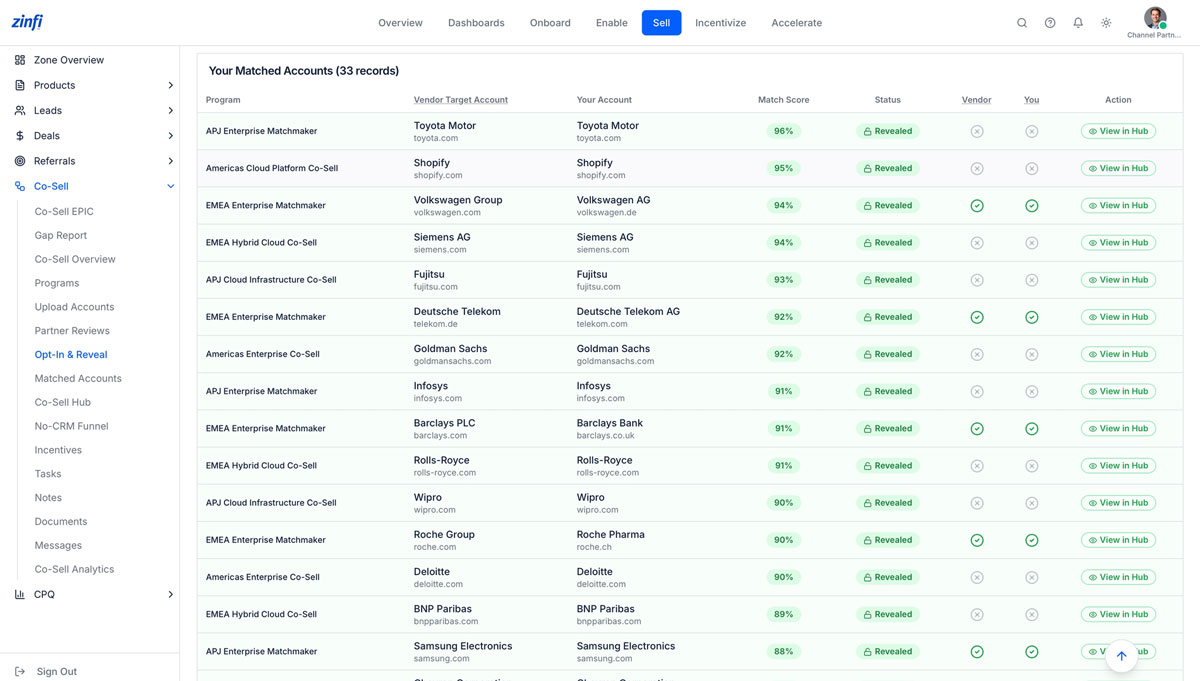
Match-by-match transparency — confidence, status, and one-click handoff
ZINFI exposes every match in a single detailed table. The partner sees vendor target account, your account, confidence, match type, program attribution, status, and dual opt-in flags — with a “View in Hub” action that takes the matched record straight into the joint workspace.
- Match-by-match transparency — every match shown with confidence percentage, status, and program
- Dual-opt-in flags: separate Vendor opt-in and Your opt-in toggles per record
- Match Type classification (Exact, Fuzzy) with confidence percentage to gauge reliability
- Status pills: Revealed, Pending, Anonymized — visible at a glance
- One-click View in Hub action takes the partner directly to the joint workspace
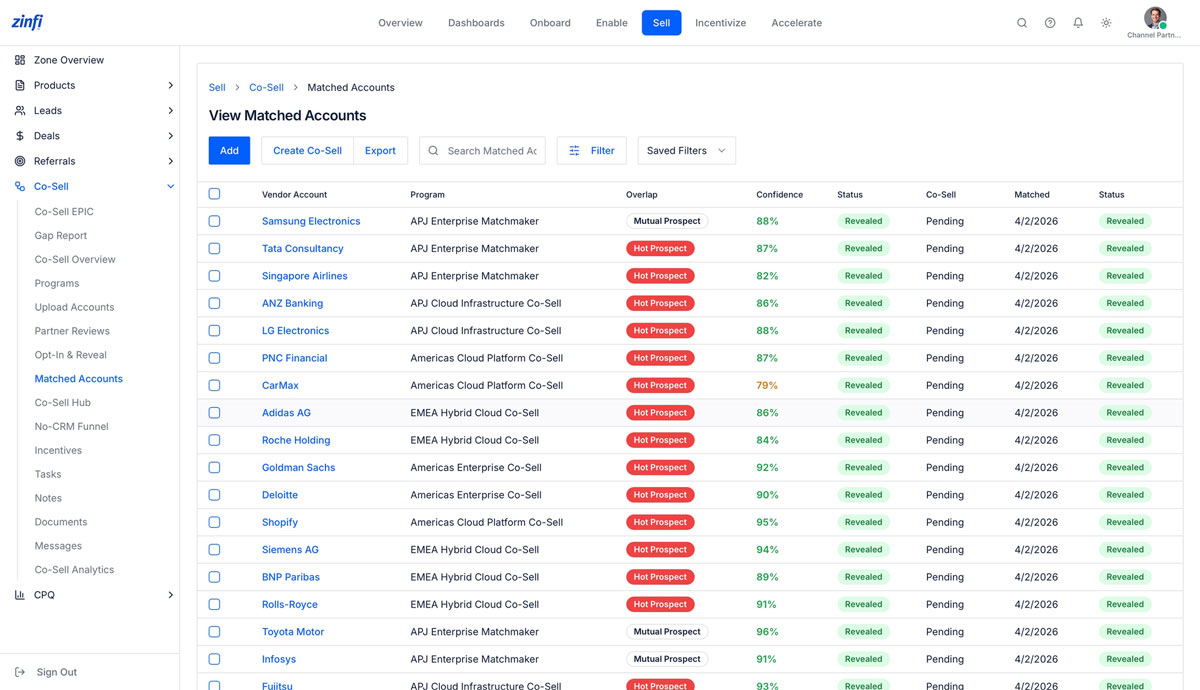
Prospect prioritization — Mutual Prospect, Hot Prospect, and confidence ranking
Once matches are revealed, the channel partner sees a prioritized roster with overlap classification — Mutual Prospect, Hot Prospect — and confidence scores ranked highest to lowest, so the rep works the most likely-to-convert accounts first.
- Three-tier overlap classification: Mutual Prospect, Hot Prospect, Mutual Customer — for prioritization
- Confidence-ranked roster — highest-scoring matches surfaced first for maximum conversion velocity
- Dual status columns: Status (Revealed) and Co-Sell (Pending) — tracks reveal AND registration state
- Matched date stamp on every record for time-since-discovery tracking
- Add, Create Co-Sell, Export, and Refresh Matches actions for full pipeline manipulation
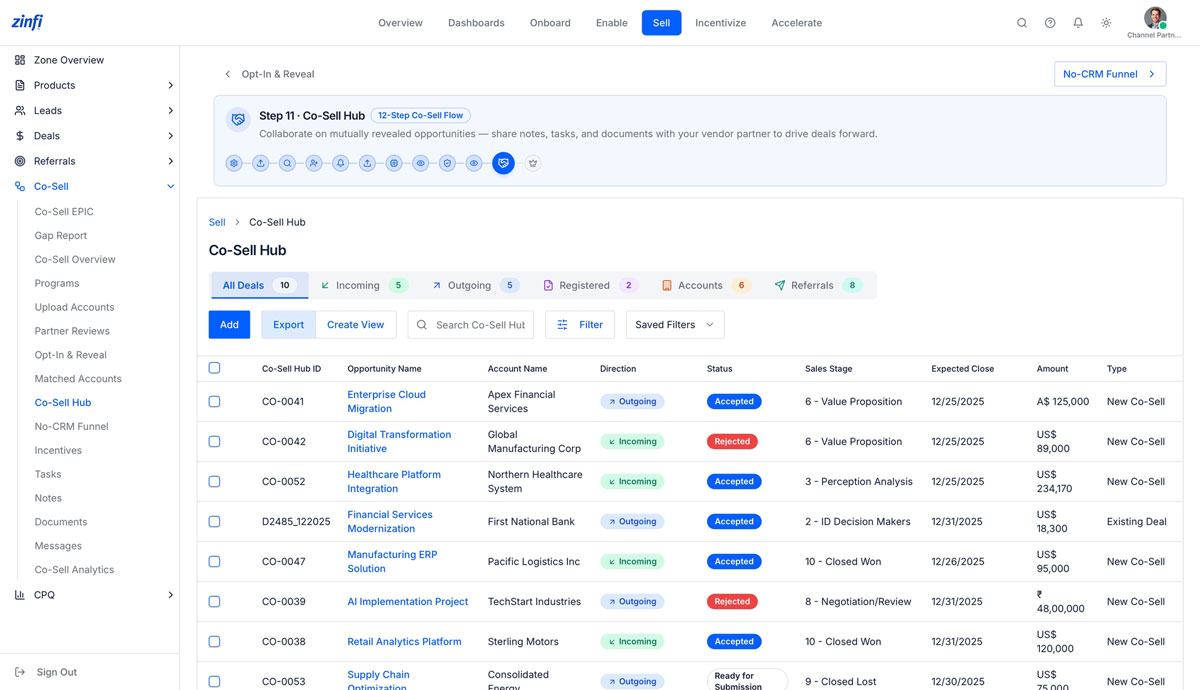
Step 11: the partner’s deal cockpit — incoming, outgoing, and joint pipeline
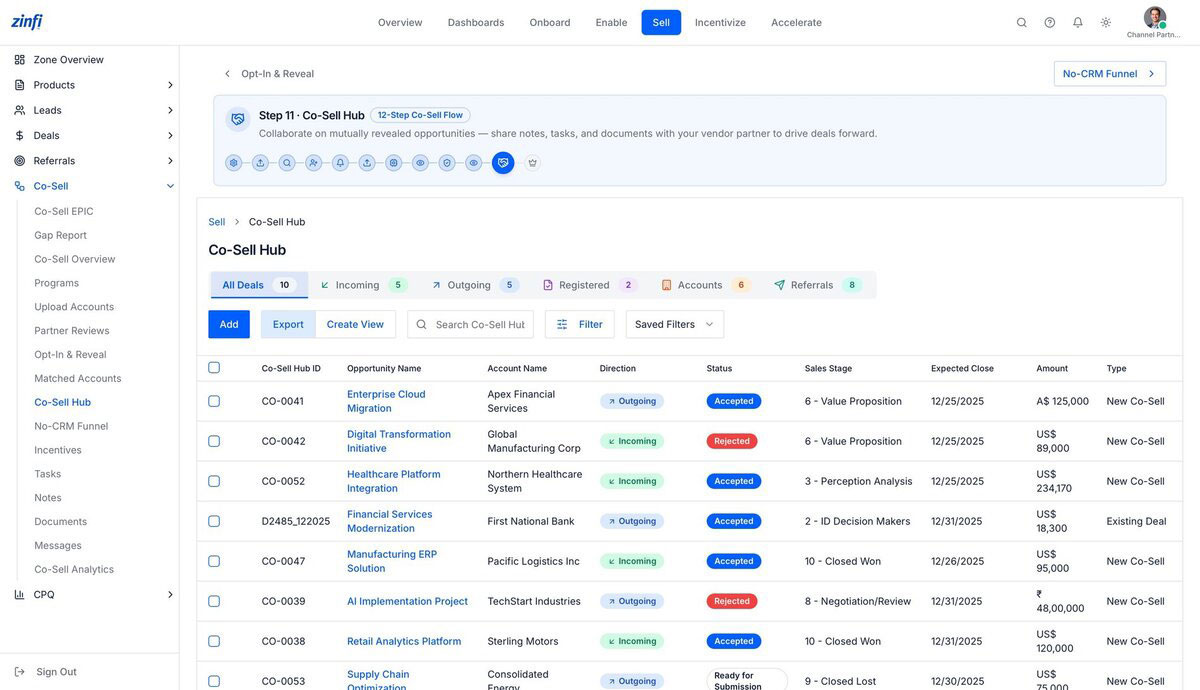
The Co-Sell Hub is where the channel partner runs the full joint pipeline — every revealed deal organized by direction (Incoming from vendor, Outgoing to vendor), with status, sales stage, expected close, amount, and deal type (New Co-Sell vs Existing Deal).
- Step 11 of the 12-Step Co-Sell Flow — collaborate on mutually revealed opportunities with notes, tasks, documents
- Six-tab navigation: All Deals, Incoming, Outgoing, Registered, Accounts, Referrals — full pipeline visibility
- Per-deal direction tagging plus status (Accepted, Rejected, Ready for Submission) and Sales Stage progression
- Multi-currency support: A$ 125,000, US$ 89,000, ₹ 48,00,000 — for global channel partners
- Type classification: New Co-Sell vs Existing Deal — distinguishes net-new pipeline from registered conversions
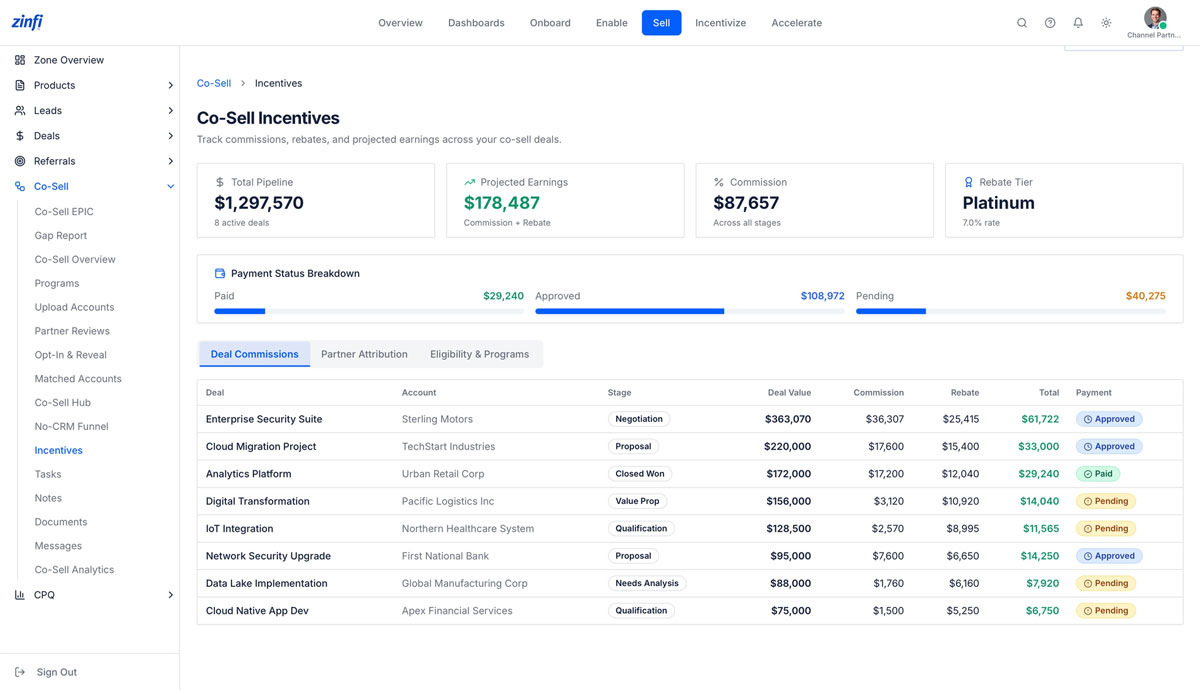
Track every commission, rebate, and projected earning across your co-sell deals
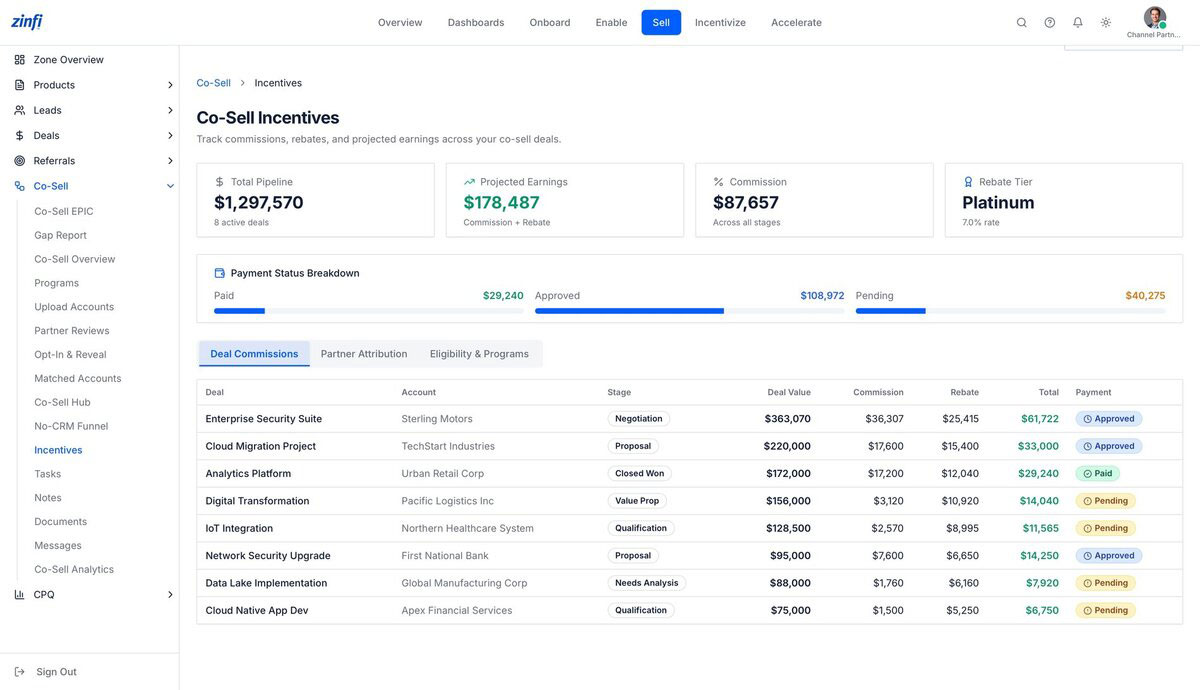
This is where the channel partner gets paid. ZINFI’s Co-Sell Incentives view shows total pipeline, projected earnings, commissions across all stages, and the rep’s current rebate tier — plus a deal-by-deal ledger of commission, rebate, and total payout per opportunity.
- Four headline metrics: Total Pipeline, Projected Earnings, Commission earned, Rebate Tier
- Payment Status Breakdown: Paid, Approved, and Pending — with dollar totals per status
- Three views: Deal Commissions, Partner Attribution, Eligibility & Programs
- Deal-by-deal ledger with Stage, Deal Value, Commission, Rebate, Total, and Payment status
- Tier-aware rebate calculations — Platinum partners earn at 7.0% rebate rate across the eligible book
Alliance App Partner
The ISV bringing an integrated product PLUS their own customer ecosystem into joint co-sell motions. Where the reseller distributes vendor products and the channel partner sales rep registers deals, the Alliance App Partner — Jennifer Liu at CloudApps — orchestrates joint customer pursuits where their app and the vendor’s platform combine into a stronger solution. Different economics. Same underlying ZINFI Co-Sell Flow.
Built for ISVs, alliances, consultants, and training partners — not just resellers
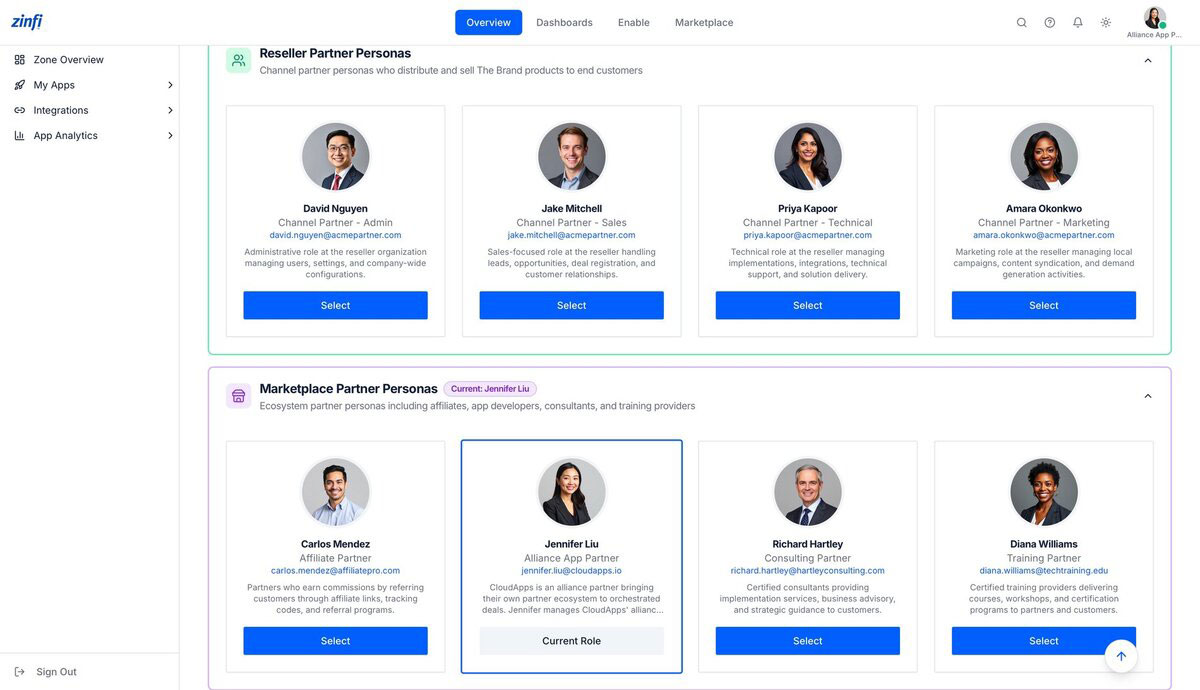
Beyond reseller partners, ZINFI recognizes Marketplace Partners — partners with fundamentally different economics. Carlos drives affiliate commissions, Richard runs consulting engagements, Diana certifies trainees — and Jennifer Liu represents the Alliance App Partner: an ISV bringing their integrated product and own customer ecosystem into joint co-sell motions.
- Marketplace Partner archetype includes Affiliate, Alliance App, Consulting, and Training partners — each with distinct economics
- The Alliance App Partner brings a built integration PLUS a customer base — unique among partner types
- Different economics, same flow: alliances earn referral fees, integration rebates, and joint-deal commissions — not product margin
- Each Marketplace persona gets a purpose-built workspace: Apps, Integrations, App Analytics, Marketplace
- Side-by-side persona model means one ZINFI deployment supports all 8 partner types (4 Reseller + 4 Marketplace) — no application sprawl
Step 1: alliance partners enroll in the same co-sell programs as resellers
ZINFI’s Co-Sell Flow doesn’t fork by partner type. Whether you’re a reseller distributing vendor products or an alliance partner bringing an integrated solution, the program enrollment, account upload, and matching mechanics are unified. One Co-Sell Flow for every partner archetype.
- Step 1 of the 12-Step Co-Sell Flow — the same Programs view a channel partner sees, scoped to alliance partner enrollment
- Alliance partners enroll in regional co-sell programs (Americas Cloud Platform, EMEA Hybrid Cloud, APJ Enterprise Matchmaker) alongside resellers
- Same governance, same vendor policy, same opt-in mechanics — different partner persona using identical flow
- Eliminates the maintenance burden of partner-type-specific applications — one Co-Sell module serves alliances, affiliates, consultants, and resellers
- Conversational AI assistant works the same for alliance partners as for resellers — natural-language program queries, same UX, persona-aware results
Step 6: upload your alliance’s joint customer ecosystem
Where a reseller uploads their end-customer relationships, an alliance app partner uploads their app’s customer base — the seed data that drives joint co-sell matching. Same upload UX, fundamentally different data lens. The vendor never sees the alliance’s raw customer list, only matches.
- Alliance app partners upload their app’s customer ecosystem — companies actively using the alliance’s integration
- Same “Your data stays private” disclosure — the vendor never sees the alliance’s raw customer list, only matches
- Alliance customer records carry Type, Region, Segment, Industry — same metadata as reseller accounts, plus Account Executive
- The matching engine compares alliance customers against the vendor’s named-account list to identify joint-pursuit opportunities
- Audit-ready uploads with timestamp, uploader, and program — partner-side governance for ISV compliance teams
Step 8: see overlap between your app’s customers and the vendor’s prospects
For an alliance app partner, this is where the magic happens. The matching engine surfaces every account where the alliance’s app is already deployed AND the vendor has a joint-pursuit opportunity — without exposing customer names until mutual opt-in. Alliance customer relationships stay protected.
- Step 8 of the 12-Step Co-Sell Flow — review masked match results between alliance customers and vendor prospects
- Match Type classification (Exact, Fuzzy, Domain) helps the alliance gauge confidence of each overlap
- Live counters scoped to the alliance’s data: Total Matches, Anonymized, Pending, Revealed
- Privacy-first: vendor account names remain hidden until both parties opt in — protects alliance customer relationships
- One reveal event triggers a bi-directional joint-pursuit motion — both parties recognize the same account simultaneously
Step 9: opt in selectively to joint pursuits worth running
An alliance app partner’s customer relationships are commercially sensitive. ZINFI’s Opt-In & Reveal screen ensures the alliance controls which joint accounts the vendor can see, account by account. Mutual opt-in. Customer-by-customer consent. No bulk data exchange.
- Step 9 — alliance opts in per matched account, not in bulk — protects every customer relationship individually
- The alliance’s full customer list never gets exposed — only matched accounts where mutual opt-in occurs
- “100% reveal rate” indicator tracks mutual-consent velocity across the program — a sign of healthy alliance engagement
- Skip-any-account control lets the alliance decline any opt-in without losing program access
- Codified data-protection guarantees protect both vendor IP and alliance customer relationships — neither side cedes control
Step 11: the alliance partner’s joint-deal cockpit
Alliance app partners run joint pipeline through the same Co-Sell Hub a reseller uses — but the deal motions are different. Outgoing: alliance brings the customer to vendor sales. Incoming: vendor refers a prospect for the alliance’s integrated solution. Both flow through one workspace.
- Step 11 of the 12-Step Co-Sell Flow — collaborate on mutually revealed opportunities with notes, tasks, documents
- Alliance-specific deal motions: Incoming (vendor refers customer for alliance’s app) vs Outgoing (alliance brings joint pursuit to vendor)
- Six-tab navigation works for alliances: All Deals, Incoming, Outgoing, Registered, Accounts, Referrals
- Multi-currency support for alliance partners with global app footprints (A$, US$, ₹, EUR)
- Status tracking from Accepted → Negotiation → Closed Won anchored to the alliance’s joint-customer pipeline
Track every alliance commission, referral fee, and integration rebate
The alliance app partner’s economic model differs fundamentally from a reseller — referral fees, integration rebates, joint-solution commissions instead of product margin. ZINFI’s Incentives module accommodates all of it with the same deal-by-deal granularity.
- Total Pipeline, Projected Earnings, Commission, Rebate Tier — alliance economics rolled up in one view
- Payment Status Breakdown (Paid, Approved, Pending) — alliance partners track their own AR cycle
- Three views: Deal Commissions (per-deal economics), Partner Attribution (joint motion tracking), Eligibility & Programs
- Alliance-specific deal types: integration rebates, joint-solution commissions, referral fees — captured in the same ledger
- Tier-aware calculations — Platinum-tier alliances earn 7.0% rebate rate across the eligible book
Analytics — Built for Every Role
The unified analytics layer that serves every co-sell persona. Same underlying data, different lens. The Global Admin sees the entire program portfolio. The Partner Account Manager sees their territory. The Channel Partner — Sales rep sees their own pipeline. AI does the connective work behind every view — matching, scoring, summarizing, surfacing the right signal to the right person at the right moment.
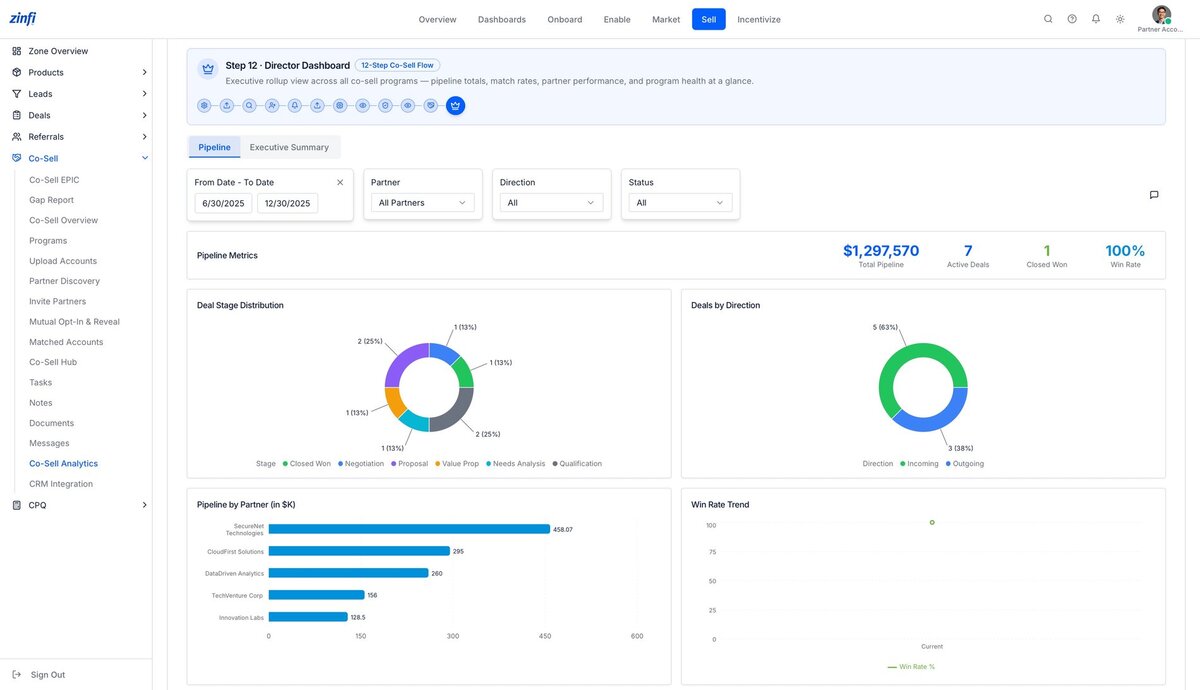
Step 12: the executive rollup across every co-sell program
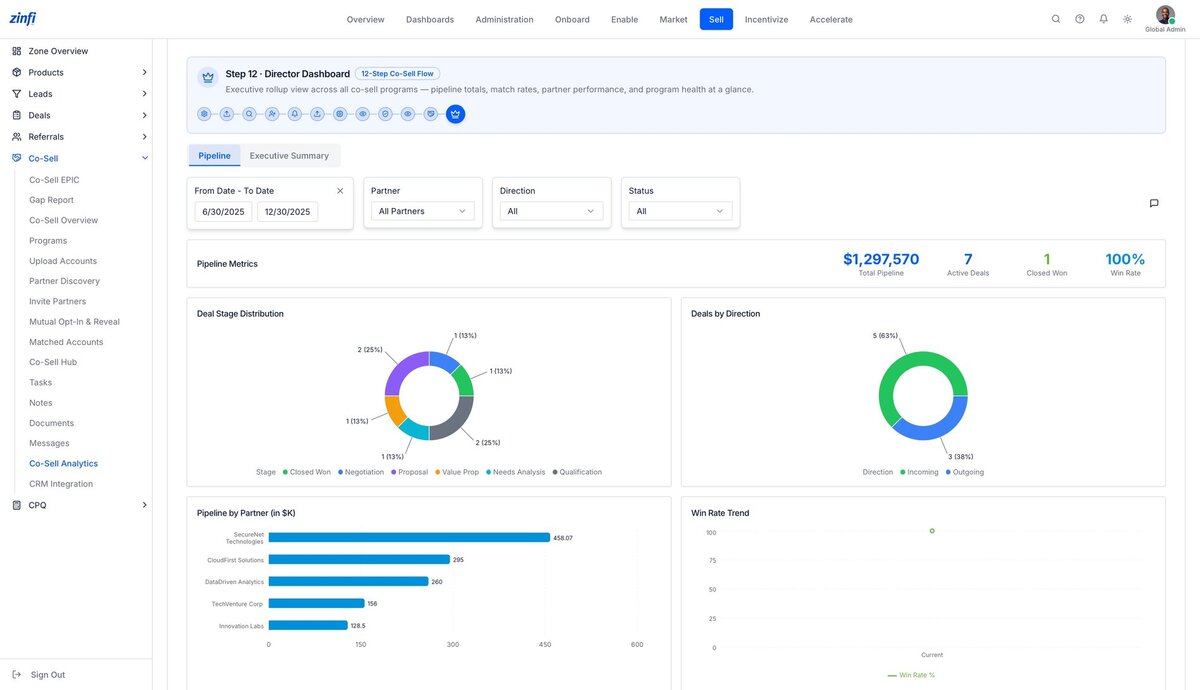
ZINFI’s 12-Step Co-Sell Flow culminates in a Director Dashboard — an AI-curated executive rollup that aggregates pipeline totals, match rates, partner performance, and program health across every program into a single, real-time view.
- The final step of the 12-Step Co-Sell Flow — executive rollup across every co-sell program
- Live Pipeline Metrics: Total Pipeline ($1.29M), Active Deals (7), Closed Won, Win Rate (100%)
- Deal Stage Distribution donut shows pipeline shape across Closed Won, Negotiation, Proposal, Value Prop, Needs Analysis, Qualification
- Deals by Direction breakdown — Incoming (5) vs Outgoing (3) co-sell deals at a glance
- Pipeline by Partner bar chart ranks revenue contribution from each channel partner — SecureNet, CloudFirst, DataDriven, TechVenture, Innovation Labs — top performers surfaced first
Executive Summary: eight KPIs that define program health
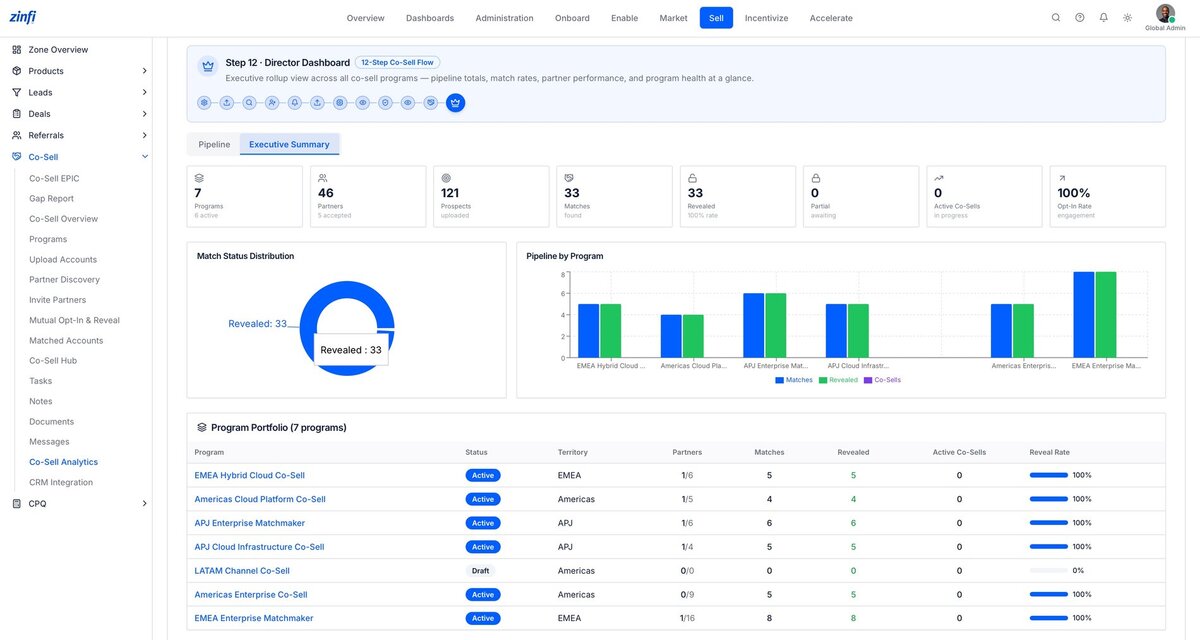
A second tab on the Director Dashboard rolls up the entire program portfolio into eight executive-grade KPIs — programs, partners, prospects, matches, reveals, opt-in rate — plus a per-program scorecard that flags weak spots before they become problems.
- Eight live KPI counters: Programs (7), Partners (46), Prospects (121), Matches (33), Revealed (33), Partial (0), Active Co-Sells (0), Opt-In Rate (100%)
- Match Status Distribution donut visualizes reveal velocity across the entire co-sell book
- Pipeline by Program bar chart compares Matches vs Revealed vs Co-Sells per program
- Program Portfolio table with Status, Territory, Partners, Matches, Revealed, Active Co-Sells, and Reveal Rate per program
- AI-generated program health scoring flags programs operating below par — the LATAM Channel Co-Sell at 0% reveal rate jumps out instantly
Same dashboard, scoped to your role — not a different application
When a Partner Account Manager opens analytics, they see the same Director Dashboard structure as the Global Admin — but every visible deal, partner, metric, and chart is automatically filtered to their territory. Same data model. Different lens. AI enforces row-level access at query time.
- Persona-aware data model — the Director Dashboard automatically scopes to the PAM’s territory and partners
- Same Pipeline Metrics, Deal Stage Distribution, and Deals by Direction charts — restricted to the PAM’s book of business
- Pipeline by Partner bar chart shows only partners assigned to the PAM’s territory
- Win Rate Trend chart visualizes the PAM’s win rate trajectory over time
- The Global Admin and the PAM see the same dashboard, not different applications — AI enforces row-level access at query time
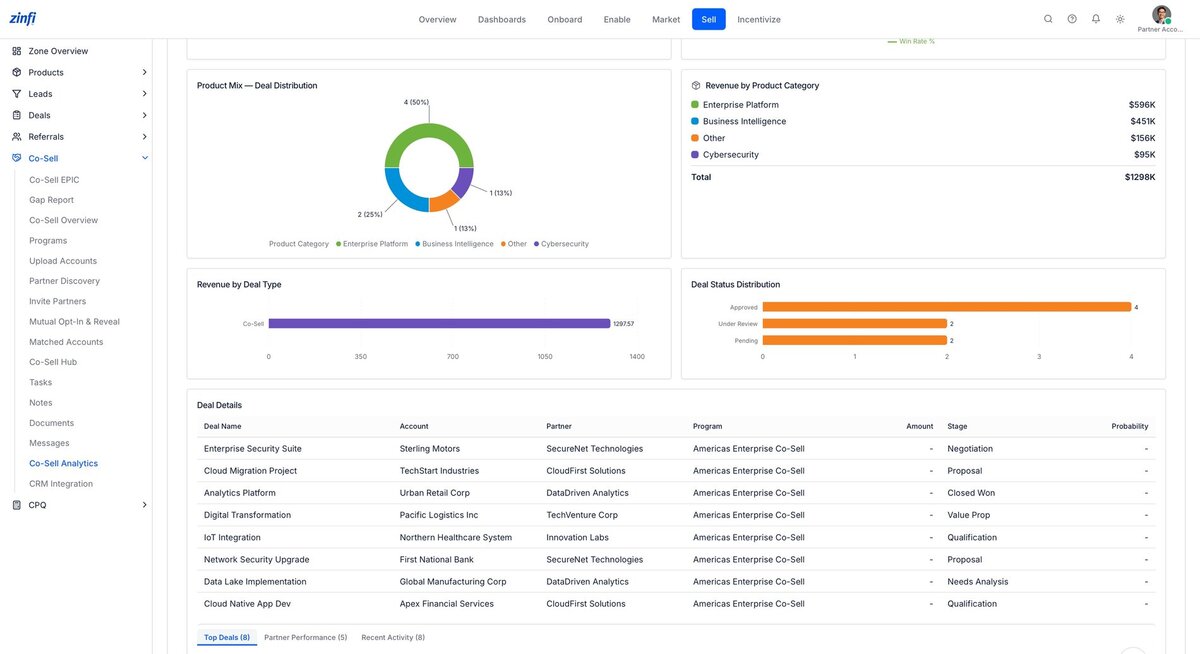
Product mix, revenue distribution, and deal-status reality checks
Beyond pipeline, ZINFI’s analytics layer surfaces product performance — revenue by Enterprise Platform vs Business Intelligence vs Cybersecurity, Co-Sell vs Referral revenue split, and approval-stage distribution across the deal book.
- Product Mix Distribution donut showing deal count by category: Enterprise Platform (50%), Business Intelligence (25%), Other (13%), Cybersecurity (13%)
- Revenue by Product Category with dollar totals: Enterprise Platform $596K, Business Intelligence $451K, Other $156K, Cybersecurity $95K
- Revenue by Deal Type isolates Co-Sell revenue ($1,297K) from other deal motions
- Deal Status Distribution bar chart showing Approved (4), Under Review (2), Pending (2)
- Sortable Deal Details table with Deal Name, Account, Partner, Program, Amount, Stage — three views: Top Deals, Partner Performance, Recent Activity
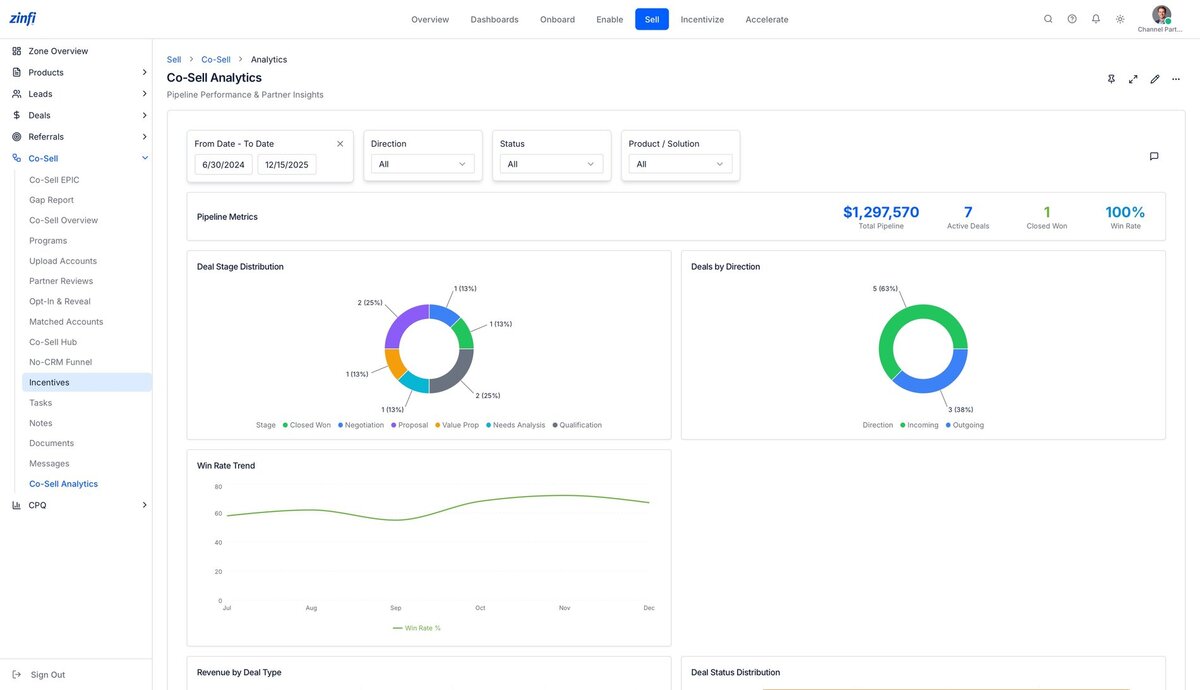
Channel partners get their own Co-Sell Analytics — securely scoped
For the Channel Partner — Sales rep, the analytics layer surfaces only their pipeline, their deals, their win rate — with the same chart structures and filters the Global Admin sees but scoped exclusively to the partner’s own data.
- Partner-side Co-Sell Analytics with the same chart vocabulary the Global Admin uses — pipeline metrics, deal stage, deals by direction, win rate trend
- Product / Solution filter alongside Direction, Status, and date filters — for partner-driven product analytics
- Pipeline Metrics scoped exclusively to the partner’s own deals — never showing vendor-wide or other-partner numbers
- Win Rate Trend chart over time helps the partner track their own performance trajectory
- Same persona-aware data governance that protects the rest of the platform — AI-enforced row-level filtering on every query
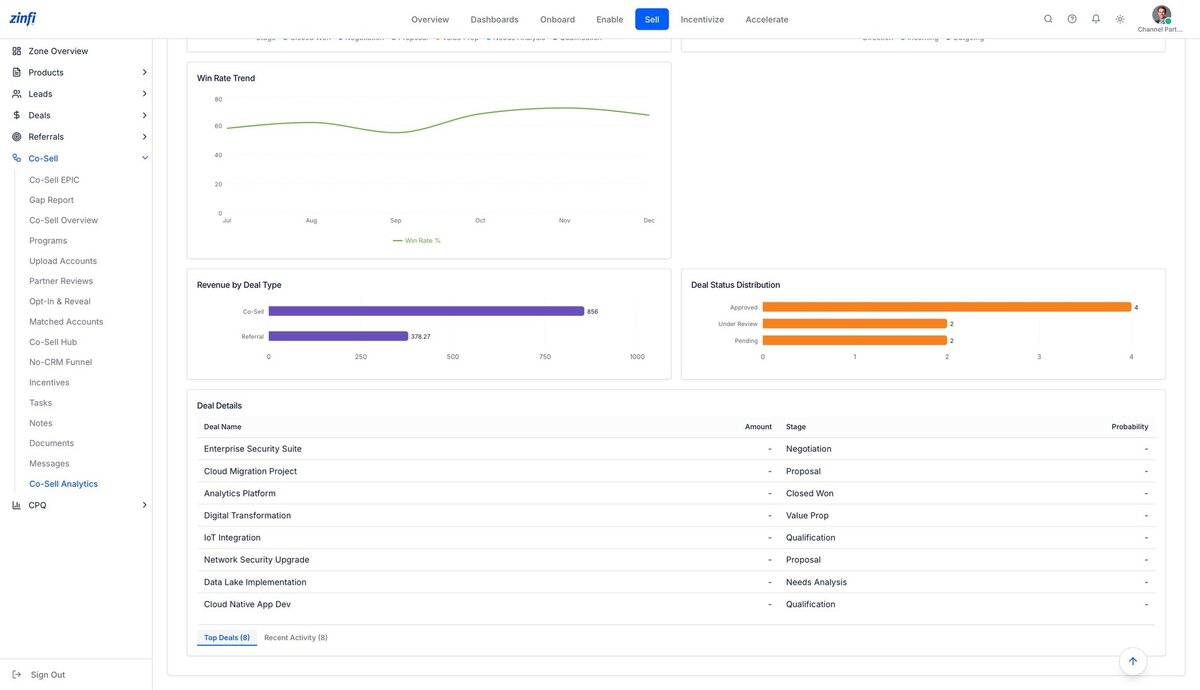
Deal-level transparency without exposing other partners’ data
The partner-side analytics layer drills into deal-level metrics — revenue by deal type (Co-Sell vs Referral), deal status distribution, and a deal-by-deal table — but the partner never sees another partner’s numbers. Cross-partner isolation is enforced by AI at every query.
- Revenue by Deal Type showing Co-Sell ($856K) vs Referral ($378K) split for the partner’s own book
- Deal Status Distribution showing Approved (4), Under Review (2), Pending (2) — partner-scoped
- Deal Details table with Deal Name, Amount, Stage, and Probability — limited to deals where the partner has visibility
- Top Deals and Recent Activity tabs for fast triage of high-value or fast-moving deals
- Cross-partner isolation: partners see their own data, never another partner’s metrics — AI-enforced at every query
Bidirectional sync with every major enterprise CRM.
ZINFI Partner Co-Selling Management integrates natively with the CRMs that run your revenue engine — keeping accounts, contacts, opportunities, partner-of-record, and co-sell status in lockstep across both sides of every deal. No CSV imports. No spreadsheet handoffs. No duplicate data.
Everything teams ask before standardizing on ZINFI Partner Co-Selling Management
Real questions from channel chiefs, partner ops leaders, alliance managers, and partner sales teams evaluating AI-native co-sell platforms. Answers reflect ZINFI Unified Partner Management (UPM) as deployed today across Fortune 100 customers.
What is partner co-selling?
Partner co-selling is a go-to-market motion in which a software vendor and one or more channel partners jointly identify, qualify, register, and close deals against shared accounts. Modern co-selling is governed by a structured flow — typically 10 to 12 steps spanning program enrollment, account upload, mutual opt-in, account and deal matching, deal registration, joint engagement, and revenue recognition.
ZINFI Partner Co-Selling Management automates this entire flow inside a single AI-native platform — eliminating the spreadsheets, email threads, and point-solution stacks that traditional co-sell motions rely on.
What is co-sell management software?
Co-sell management software is the operational system of record for partner co-selling. It manages partner programs, account uploads, mutual opt-in and reveal, account matching, deal matching, deal registration, partner reviews, joint task and message orchestration, and analytics.
ZINFI Partner Co-Selling Management is the AI-native co-sell platform within ZINFI Unified Partner Management (UPM) — supporting alliance, reseller, affiliate, and consultant partner types in a single unified flow with native CRM and co-sell program integrations.
How does ZINFI’s Co-Sell Matchmaker work?
ZINFI Co-Sell Matchmaker uses AI to match accounts, contacts, and active opportunities between a vendor’s CRM and any partner that has opted in. It surfaces overlap, scores joint-sell potential, and recommends the highest-probability co-sell plays — eliminating the manual spreadsheet reconciliation that consumes most Partner Account Manager hours.
Matchmaker is part of ZINFI’s 12-step co-sell flow and integrates natively with Salesforce, HubSpot, and Microsoft Dynamics 365.
Which CRM systems does ZINFI Partner Co-Selling Management integrate with?
ZINFI Partner Co-Selling Management offers native, bidirectional CRM integrations across the systems that run enterprise revenue engines — Salesforce, HubSpot, Microsoft Dynamics 365, and SAP — with additional support for Oracle, Zoho, Pipedrive, Freshsales, and more via ZINFI’s universal CRM connector framework.
Integrations cover account sync, contact sync, opportunity matching, deal registration, partner-of-record attribution, status updates, and joint pipeline reporting. Vendors run a single unified co-sell flow across every partner type without spreadsheet handoffs, CSV imports, or duplicate data entry.
What is the difference between partner co-selling and deal registration?
Deal registration is a discrete control point — a partner declares an opportunity to a vendor and receives protection or pricing. Partner co-selling is the full lifecycle around it: program enrollment, account matching, mutual opt-in, deal matching, joint task and message orchestration, conflict resolution, and incentive payout.
ZINFI handles both natively in one unified platform. Deal Registration is one application within the broader Partner Co-Selling Management surface — sharing data, partner identity, and analytics with every other zone of ZINFI Unified Partner Management (UPM).
Is ZINFI Partner Co-Selling Management AI-native?
Yes. AI is embedded throughout the platform, not bolted on. ZINFI uses AI for partner matching, account matching, deal matching, deal scoring, automated task generation, meeting and note synthesis, and multi-channel partner messaging across Portal, Microsoft Teams, Slack, Email, and WhatsApp.
AI is a first-class capability within ZINFI Unified Partner Management (UPM) — every persona, every workflow, and every analytics surface is AI-aware out of the box.
What is included in ZINFI’s 12-step co-sell flow?
ZINFI’s 12-step co-sell flow spans the entire joint-sell lifecycle: (1) co-sell program setup, (2) partner enrollment, (3) partner persona configuration, (4) vendor account upload, (5) partner account upload, (6) account profiling, (7) partner review and approval, (8) mutual opt-in and reveal, (9) account matching, (10) deal matching and scoring, (11) co-sell hub orchestration with tasks, notes, and messages, and (12) director-level analytics and pipeline dashboards.
Every step is configurable, persona-aware, and instrumented for analytics. The same flow adapts to alliance, reseller, affiliate, and consultant partner types — only the economics, contracting, and incentive treatment differ.
How does ZINFI compare to Crossbeam, Reveal, and PartnerStack for co-selling?
Crossbeam and Reveal are point solutions focused on account-overlap data sharing. PartnerStack focuses primarily on B2B SaaS affiliate and reseller payouts. ZINFI is a unified platform that delivers account overlap, deal matching, deal registration, partner programs, MDF, rebates, rewards, training, and analytics in one system — supporting alliance, reseller, affiliate, and consultant partner types under a single unified co-sell flow.
ZINFI is the only platform with a native 12-step co-sell flow inside Unified Partner Management (UPM), and is rated #1 in Customer Satisfaction on G2 in the PRM category.
What partner types does ZINFI Partner Co-Selling Management support?
ZINFI supports every partner type under one co-sell flow:
Alliance and ISV partners — AWS, Microsoft, Salesforce, Google Cloud, HubSpot ecosystems. Resellers and VARs. Affiliate and referral partners. Consulting and services partners. Managed service providers (MSPs).
The same 12-step flow adapts to each partner type — only the economics, contracting, and incentive treatment differ.
Can ZINFI customers create custom roles, relationships, and workflows beyond the personas shown?
Yes — ZINFI is a fully configurable platform. The five personas illustrated on this page — Global Admin, Partner Account Manager, Channel Partner Sales, Alliance App Partner, and Analytics — are common patterns shown for clarity, not platform limits.
Every ZINFI vendor creates unlimited custom roles, defines their own relationships, approval hierarchies, escalation paths, and tailors every workflow step to match their go-to-market motion. There is no fixed schema. Real ZINFI deployments routinely run dozens of custom personas across alliance, reseller, affiliate, consultant, and MSP partner ecosystems — each with tailored UI, permissions, dashboards, and automation.
How does ZINFI handle multi-partner conflict resolution?
ZINFI applies configurable conflict-resolution rules at the account-matching and deal-matching layer. When two or more partners claim the same account or opportunity, ZINFI surfaces the conflict, applies vendor-defined rules — first-registered, highest-tier, account-owner override, or manual review — and routes the decision to the appropriate Partner Account Manager.
All conflict events are logged for compliance and reportable in analytics. Cross-partner data isolation is enforced at the field level, so revealed data flows only to the parties that mutually opted in.
What ROI can vendors expect from AI-native co-sell automation?
ZINFI customers consistently report measurable improvements when migrating from spreadsheets and point solutions to AI-native co-sell automation: faster partner activation, reduced deal-conflict cycle time, higher partner-sourced pipeline coverage, and meaningful lift in joint deal velocity.
ZINFI’s 12-step co-sell flow eliminates the manual reconciliation, email chasing, and spreadsheet handoffs that typically consume the majority of a Partner Account Manager’s week — letting partner ops teams scale partner programs without scaling headcount.
Is ZINFI Partner Co-Selling Management part of Unified Partner Management (UPM)?
Yes. Partner Co-Selling Management is the flagship application in the SELL zone of ZINFI Unified Partner Management (UPM). UPM is the only platform that natively unifies the full partner lifecycle — Onboard, Enable, Market, Sell, Incentivize, and Accelerate — under a single data model, single workflow engine, and single AI layer.
Partner Co-Selling Management shares accounts, contacts, partners, and analytics with every other ZINFI application — eliminating the data fragmentation and reconciliation overhead that plagues point-solution stacks.